
The most common ecommerce SEO mistakes are rarely isolated “SEO problems.” They usually involve weak product or category content, technical barriers, unclear site architecture, poor internal linking, incomplete product data, or a failure to connect search visibility to how customers actually evaluate and buy products.
Here’s what I see over and over: ecommerce stores are making versions of these same mistakes, sometimes across hundreds or thousands of pages. Individually, they may look small. At scale, they can limit search visibility, make products harder to discover, and leave meaningful organic revenue on the table.
The frustrating part? Most of these mistakes are fixable. They’re not mysterious. They’re not technical wizardry. They’re just… not being done.
You might be doing one or two of these. You might be doing all of them. Either way, the difference between a store that’s invisible in search and one that’s generating consistent organic revenue often comes down to whether you’re avoiding these 15 mistakes.
Let’s walk through them. I’ve organized them by impact – what costs you the most, first.
The Critical Mistakes (Fix These First)
Mistake 1: Writing Thin Product Descriptions
Thin ecommerce product content becomes a problem when the page does not give search engines or customers enough information to understand what makes the product relevant, different, or worth choosing.
The issue isn’t hitting an arbitrary word count. A concise product description can work perfectly well when the rest of the page provides strong specifications, imagery, reviews, FAQs, variant information, and other useful context. The problem is when the entire page leaves important questions unanswered or simply relies on images to replace content/text.
It might say something like: “Premium cotton t-shirt. Available in 5 colors. 100% cotton. Comfortable and durable.”
Here’s an example:
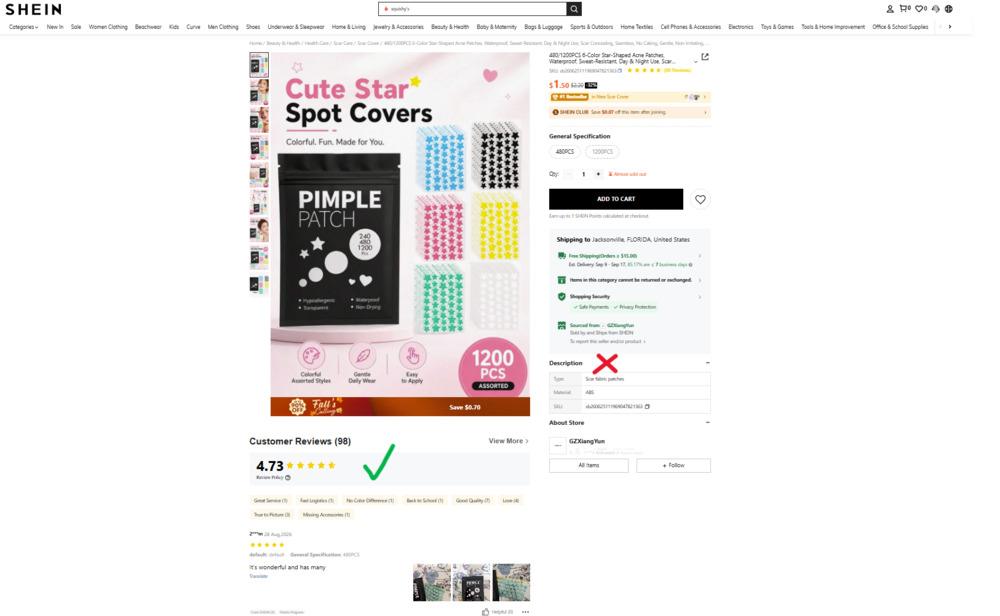
Why Google deprioritizes this: Thin content looks like low-effort, low-value content. Google is trying to rank pages that actually help customers make decisions. A vague, generic description does neither.
But here’s the bigger problem: A thin description also hurts conversions. Customers land on your page with questions. They need to know what makes your t-shirt different from the 100 other t-shirts they could buy. If you don’t tell them, they leave.
The fix:
Build the product page around the information customers actually need to make a decision. Depending on the product, that might include:
- What’s the fabric like to wear? (Breathable? Soft? Durable?)
- What’s it made from? (Be specific – not just “cotton” but “100% organic cotton sourced from [region]”)
- Who is this for? (Casual wear? Gym? Professional?)
- What sizes/fits are available?
- How should they care for it?
- What makes it different from generic alternatives?
In ecommerce audits, I look beyond description length. I’m looking at whether important products have enough unique information to distinguish them from similar products, manufacturer copy, and competing listings, and whether the page answers the questions a customer would reasonably need answered before buying.
Example of better:
“Our premium organic cotton t-shirt combines breathable fabric with a durable construction designed to last through countless washes. Made from GOTS-certified cotton grown in fair-trade farms, each tee features a relaxed fit, reinforced stitching, and natural fiber that softens with wear. Perfect for everyday wear, layering, or as a comfortable base layer. Available in sizes XS–3XL with a vintage wash that adds character. Sustainably produced with a carbon-neutral shipping option.”
Notice the difference? You’re answering questions, highlighting benefits, addressing objections, and telling a story about why someone should choose this shirt.
SEO benefit: This gives Google more text to understand the product. It includes natural keyword variations (organic cotton, fair-trade, sustainable, durable). It answers the questions people are actually searching for.
Conversion benefit: A customer reads this and thinks, “This is made differently. This is worth choosing.” That’s the whole point.
Mistake 2: Using Duplicate Content Across Product Variants
The problem: You have the same product in 10 colors and 5 sizes. You copy-paste the exact same product description across all 40 variations.
Or worse, you use the manufacturer’s description for all your listings.
Why this hurts:
Google struggles to understand which version is the “main” product and which are variants. It might index all 40 versions separately. Duplicate or near-duplicate product variants can create unnecessary indexing and canonicalization complexity, particularly when multiple URLs represent substantially the same product.
The SEO problem isn’t that Google “penalizes” a store for having legitimate variants. The issue is making it clear which URLs should be indexed, how the variants relate to one another, and whether separate pages provide enough unique value to deserve separate search visibility.
Your conversion rate also tanks because customers looking for “blue size medium” land on a page describing the product generically, without mentioning the blue or the medium.
The fix:
Use technical solutions + unique content:
Option 1: Consolidate Variants When Separate Search Visibility Isn’t Needed
- One product page with all color/size options
- One unique description (not duplicated)
- Use schema markup to indicate variants
- Helps Google understand the relationship
- Better user experience (customers find all options on one page)
Option 2: Use Separate Variant URLs When There Is a Strategic Reason
- Use canonical tags to point variants to a main version
- Write unique title tags for each variant (“Red Running Shoes Size 11” vs. “Blue Running Shoes Size 11”)
- Write unique meta descriptions that mention the differentiating attribute
- Add variant-specific content (e.g., “Red pairs well with…” or “Size 11 fits…”) rather than copying descriptions
Example of unique variant content:
Main product page: “Premium running shoes engineered for long-distance performance…”
Variant title: “Premium Running Shoes – Men’s Size 11 Red”
Variant meta: “Men’s size 11 red running shoes with breathable mesh, perfect for long-distance training.”
What you’re avoiding: Unnecessary duplication, unclear canonical signals, wasted crawling, and multiple URLs competing for substantially the same search intent.
What you’re gaining: Better rankings for variant-specific searches, clearer intent match, better conversion.
Mistake 3: Duplicate Meta Tags Across Multiple Products
The problem: You have 50 similar products. Your title tags all say something generic like “Premium Running Shoes” and your meta descriptions all say “High-quality running shoes at great prices.”
Duplicate title tags make it harder for search engines and searchers to distinguish between similar ecommerce pages, especially when the products target different attributes, uses, or search intent.
Duplicate meta descriptions are primarily a missed messaging opportunity. They don’t create the same SEO problem as duplicate page content, but generic snippets can make multiple products look indistinguishable in search.
Why it matters:
Your click-through rate from search suffers because your snippets aren’t compelling or distinct. Customers searching for specific products (“running shoes for wide feet”) see generic descriptions that don’t match their intent.
Google also has a harder time understanding which page should rank for which query.
The fix:
Make every title tag and meta description unique:
Title Tag Formula: Primary Keyword + Differentiator + Brand
Examples:
- “Running Shoes for Wide Feet – Men’s Size 11 | Acme Shoes”
- “Women’s Running Shoes – Trail & Road Performance | Acme Shoes”
- “Running Shoes with Arch Support – Orthopedic Design | Acme Shoes”
Meta Description Formula: Brief description + unique benefit + CTA
Examples:
- “Premium running shoes engineered for wide feet with extra arch support. Free returns on all orders. Shop our collection now.”
- “Lightweight trail running shoes with aggressive tread for off-road performance. High-traction outsole. Shop now.”
Length targets:
Keep titles and descriptions concise enough to communicate the most important information clearly in search results, but prioritize relevance and differentiation over hitting a rigid character count. Google may truncate or rewrite either based on the query and device.
The payoff: Higher click-through rates from search. Better relevance signals to Google. More targeted traffic.
Mistake 4: Missing or Weak Schema Markup
Product structured data gives search engines machine-readable context about ecommerce information such as product name, price, availability, brand, ratings, reviews, and offers.
Without valid Product structured data, Google may still understand information from the visible page, but the store can miss opportunities to qualify for product-rich search experiences and make important product attributes more explicit to search systems.
Structured product data also contributes to a clearer machine-readable understanding of a product, although schema markup alone does not guarantee visibility or citations in AI-generated answers.
Why it costs you:
Rich snippets aren’t showing in your search results. You’re missing star ratings, pricing information, and availability badges that could increase your click-through rate.
AI tools like ChatGPT or Perplexity are having trouble understanding and citing your products because the data isn’t structured.
Google’s crawler is less confident about key product attributes (price, availability, in stock/out of stock).
The fix:
Implement schema.org/Product markup. At minimum, include:
- Product name
- Price and currency
- Availability (InStock, OutOfStock, PreOrder, etc.)
- Image URL (high-quality product image)
- Description
- Brand
- Aggregate rating and review count (if you have reviews)
Here’s what it looks like (simplified):
json
{
  "@context": "https://schema.org/",
  "@type": "Product",
  "name": "Premium Running Shoes - Men's Size 11",
  "image": [
    "https://example.com/running-shoes-11.jpg"
  ],
  "description": "Lightweight running shoes with breathable mesh and arch support.",
  "brand": {
    "@type": "Brand",
    "name": "Acme Shoes"
  },
  "offers": {
    "@type": "Offer",
    "url": "https://example.com/running-shoes-size-11",
    "priceCurrency": "USD",
    "price": "129.99",
    "availability": "https://schema.org/InStock"
  },
  "aggregateRating": {
    "@type": "AggregateRating",
    "ratingValue": "4.8",
    "ratingCount": "247",
    "bestRating": "5",
    "worstRating": "1"
  }
}
Validation tool: Google’s Rich Results Test helps you verify your markup is correct.
The payoff: Rich snippets in search results, better AI tool understanding, higher confidence from Google’s crawler, improved CTR.
The High-Impact Mistakes (Fix These Next)
Mistake 5: Slow Mobile Page Speed
The problem: Your product pages load in 4-5 seconds on mobile. Customers abandon them before the image even loads.
Why Google cares: Page speed is a ranking signal. It’s also a Core Web Vitals metric that Google explicitly considers. But more importantly, slower pages convert worse.
Slow ecommerce pages can hurt both customer experience and organic performance, but there is no universal load-time threshold that determines whether a page will rank or convert.
For SEO, evaluate Google’s Core Web Vitals and real-user performance data. For the business, pay particular attention to whether slow-loading product and category templates correspond with weaker engagement or conversion performance.
On larger ecommerce sites, I’m usually less interested in whether one product page is slow than whether the same performance issue affects an entire template. Fixing one oversized image helps one page. Fixing how product images are generated or served can improve hundreds or thousands of pages at once.
The fix:
Target <3 seconds on mobile. Here’s where to start:
Image optimization (usually the biggest culprit)
- Compress images without losing quality
- Use modern formats like WebP
- Implement lazy loading (images load as you scroll, not all at once)
- Use appropriately-sized images (don’t serve a 4000px image on mobile)
Reduce unnecessary code
- Minify CSS and JavaScript
- Remove unused code
- Defer non-critical JavaScript
Use a CDN
- Content Delivery Network serves your files from servers closer to your users
- Dramatically improves load times for international traffic
Enable caching
- Browser caching tells repeat visitors to use cached versions of your pages
- Server-side caching reduces database queries
Measurement:
- Google PageSpeed Insights (free)
- GTmetrix (free and paid options)
- Check mobile specifically—it’s usually slower than desktop
The payoff: Better rankings, higher conversion rates, reduced bounce rate, better user experience.
Mistake 6: Poor Mobile Optimization (Beyond Speed)
The problem: Your site is technically “responsive” because it resizes on mobile. But the experience is bad.
Maybe buttons are too small to tap easily. Maybe text is tiny and hard to read. Maybe the checkout form requires horizontal scrolling. Maybe important information (price, shipping, availability) is buried below the fold.
Why it matters: Mobile optimization matters for ecommerce because Google primarily uses the mobile version of a site for indexing, while customers increasingly expect the same product information, navigation, and checkout functionality regardless of device.
A responsive layout alone doesn’t guarantee a good mobile ecommerce experience.
The fix:
Test on actual mobile devices (not just a resized desktop browser):
- Touch targets: Buttons and clickable elements should be at least 48px
- Readable text: Font sizes should be 16px minimum for body text
- Logical layout: Important information should be visible without scrolling
- Fast forms: Mobile forms should be simple and quick (not 20 fields)
- Clear CTAs: “Add to Cart” button should be obvious and easy to tap
- Image quality: Images should look good at mobile resolution
- Navigation: Menu should be simple and accessible (hamburger menu is fine)
Test important page templates in PageSpeed Insights and Chrome DevTools, but also test the actual shopping experience on real mobile devices.
The payoff: Better rankings (mobile-first indexing), higher conversion rates, reduced bounce rate.
Mistake 7: Confusing or Parameter-Heavy URLs
The problem: Your product URLs look like this:
/product.php?id=12345&color=red&size=m&session=abc123
Or this:
/2024/05/red-shirt-men-cotton-XL-size-large-available-now
Why it’s bad:
- Confusing to humans (not readable or memorable)
- Confusing to search engines
- Tracking parameters create duplicate content versions
- Long, keyword-stuffed URLs look spammy
- Wasted crawl budget on parameter variations
Parameter-heavy ecommerce URLs become an SEO problem when filters, sorting options, tracking values, or session parameters create large numbers of crawlable URLs that represent substantially the same content.
Parameters themselves aren’t automatically bad. The real question is whether they create useful, indexable pages or unnecessary crawl and duplication.
The fix:
Use simple, readable, parameter-free URLs:
/red-running-shoes(product category)/red-running-shoes-mens(subcategory)/red-running-shoes-mens-size-11(specific variant)
Or simply:
/products/running-shoes(category)/products/red-running-shoes-mens(specific product)
Rules:
- Remove session IDs and tracking parameters from the main URL (handle these separately in your code)
- Avoid date stamps (
/2024/05/product) - Use hyphens, not underscores
- Keep it short and descriptive
- Use consistent structure across all products
Technical detail: If you must use parameters (for filters, sorting, etc.), tell Google which version is the primary one using canonical tags.
The payoff: Cleaner crawl budget usage, no duplicate content issues, better UX, improved rankings.
Mistake 8: Weak Internal Linking Strategy
The problem: Ecommerce internal linking helps search engines understand relationships between products, categories, subcategories, and supporting content while helping authority and customers move through the site. Weak internal linking can leave commercially important pages difficult to discover or poorly connected to the rest of the catalog.
Google uses internal links to understand what’s important on your site and how pages relate to each other. When your pages are isolated, Google has a harder time understanding your structure.
I’ve audited ecommerce sites where perfectly valid product pages existed but were barely connected to the rest of the website.
Why it matters:
- Crawlability: Google might miss products that aren’t well-linked
- Authority distribution: Internal links help distribute link equity and indicate which categories, products, and supporting resources are structurally important.
- Navigation clarity: Customers can’t easily find related products
- Redundant paths: No shortcuts between related content
The fix:
Create intentional internal linking:
Product-to-Product Links
- Link related products: “Customers who bought [this product] also liked [related product]”
- Link complementary items: Running shoes to running socks
- Link product variants: All colors of the same product on the variant pages
- Use descriptive anchor text: “Best running shoes for wide feet” not “click here”
Product-to-Category Links
- Link product pages back to their category page
- Use category name as anchor text: “Back to running shoes” or “More options in our running shoe collection”
Category-to-Pillar Links
- Link main categories to broader pillar pages
- Example: “Men’s Shoes” → “All Shoes” → “Shop All”
Blog-to-Product Links
- Blog post about “How to Choose Running Shoes” → links to your running shoe products
- Buying guides → product pages they recommend
- Tutorials → relevant products
Example: “Our premium running shoes for wide feet (which we cover in our buying guide) come in 5 colors and include custom arch support.”
Anchor text matters: Use natural, descriptive anchor text that tells Google and users what the linked page is about.
The payoff: Better crawlability, authority distribution to important pages, improved rankings for linked pages, better customer navigation.
Mistake 9: No Customer Reviews or Review Management
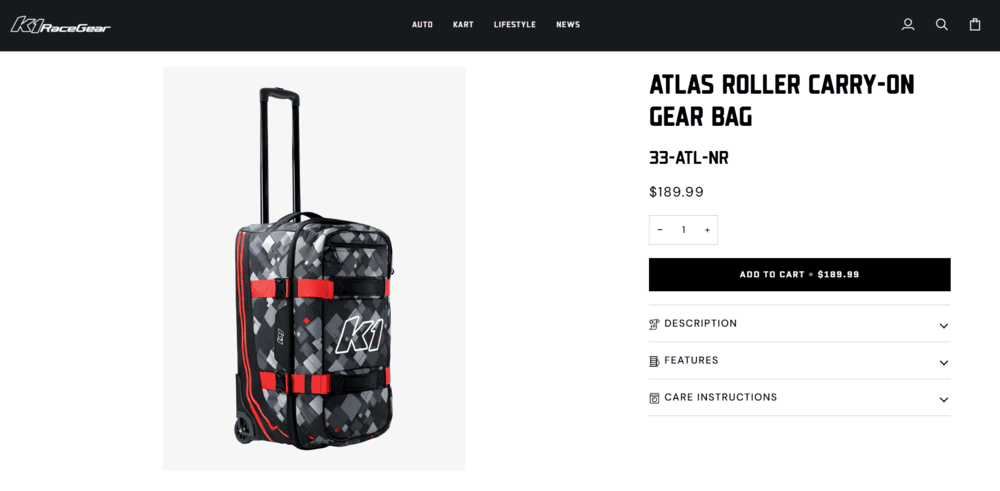
The problem: Your product pages have zero reviews. Or maybe you have 2 reviews from launch day and nothing since.
Why it kills you:
Product reviews strengthen ecommerce pages primarily by providing trust, firsthand customer experience, fresh user-generated content, and additional information that can help shoppers evaluate a product.
Reviews may also contribute to enhanced search appearances when valid review and product structured data is implemented, but there is no simple formula where a specific review count or rating guarantees higher organic rankings.
This is where SEO and conversion overlap. Reviews may support search visibility, but their bigger business value is often helping a customer decide whether to choose your product.
Why customers are affected:
Before buying, people read reviews. If your product page has none, they immediately wonder if it’s legit or if nobody wants it.
The fix:
Implement review infrastructure:
- Use a native review system (if your platform supports it)
- Or use a third-party service: Trustpilot, Yotpo, Reviews.io, Judge.me
- These services handle collection, moderation, and display
Drive reviews actively:
- Post-purchase emails asking for reviews (usually 1 week after delivery)
- Make review submission easy (not a 10-step process)
- Offer incentives (not payment, but small discounts on next purchase)
- Follow up with customers who don’t review
Display reviews prominently:
- Star rating on product pages (above the fold)
- Individual review text and photos
- Aggregate rating in search results (via schema markup)
- Review count visible
Respond to reviews:
- Positive reviews: thank the customer
- Negative reviews: address the issue professionally, offer to solve the problem
- This signals that you care about customer experience
Set review goals based on order volume, repeat purchase behavior, current review rate, and the percentage of customers you can realistically invite to participate.
But once you have them, they compound. New customers are more likely to leave reviews, which brings more customers, which generates more reviews.
The payoff: Better rankings, higher conversion rates, lower return rates, brand credibility.
Mistake 10: Non-Existent or Weak Backlink Strategy
The problem: You’re not pursuing backlinks. You’re waiting for them to happen organically. Or you don’t understand why they matter.
Why it’s expensive:
Backlinks are still one of Google’s top ranking factors. A product page with zero backlinks competing against a product page with 20+ quality backlinks is fighting uphill.
The fix:
Build a modest backlink strategy:
Create linkable content:
- Original research or data (“State of ecommerce in 2024”)
- Comprehensive guides (“The Complete Guide to Running Shoes”)
- Best-of lists (“15 Best Sustainable Fashion Brands”)
- Unique tools or calculators
Identify link opportunities:
- Use Ahrefs or Semrush to see where competitors get links
- Find blogs and sites in your category that link to competitors
- Look for directory listings and industry associations
- Check for guest post opportunities on relevant sites
Reach out personally:
- Don’t spam. Reach out to relevant bloggers with personalized pitches
- “I read your article on running shoes and thought you’d appreciate our research on shoe longevity”
- Make it easy for them to link (send them what you want them to share)
Build digital PR:
- Get mentioned in press releases, news articles, industry publications
- Relevant editorial mentions can strengthen both brand discovery and external authority.
Be linkable:
- Create content that deserves links
- Make it easy to share (social buttons, easy sharing)
- Have a clear author bio that includes your website link
Start small:
Backlinks and third-party mentions can strengthen ecommerce authority, but the value of a link depends far more on relevance, credibility, context, and the competitive landscape than on reaching an arbitrary link count.
You don’t need 1,000 backlinks. But you do need:
- Quality links from relevant, authoritative sources will move the needle
- Quality > quantity (one link from an authority site beats 100 links from spammy sites)
The payoff: Authority increases, rankings improve, more visibility.
The Experience & Visibility Mistakes (These Compound)
Mistake 11: High Bounce Rates (Visitors Leaving Immediately)
The problem: Customers land on your product page and leave within 3 seconds. Your bounce rate is 80%+.
Why it happens:
- Page speed (we covered this above)
- Title/snippet promise doesn’t match the page (customer searched “red running shoes” and landed on a filter page)
- Page looks unprofessional or untrustworthy
- Missing key information (price, availability, shipping)
- No images or poor-quality images
The fix:
Match intent first:
- Customer searches: “red running shoes”
- You show: A page about red running shoes (not a filter, not a generic category page)
- Page headline should reinforce what they searched for
- Product image should show clearly it’s red
- Price and availability should be visible immediately
Then optimize the experience:
- Fast loading (3 seconds max)
- High-quality product images (multiple angles, close-ups)
- Clear pricing and shipping info
- Visible reviews/ratings
- Easy way to buy (prominent “Add to Cart” button)
- Trust signals (return policy, secure checkout, guarantees)
A high bounce rate can be a useful diagnostic signal for ecommerce, but it should be interpreted in context rather than treated as a Google ranking factor.
If an important product or category page receives qualified organic traffic but visitors consistently leave without engaging or converting, investigate whether the page matches search intent and gives shoppers the information they expected to find.
Compare bounce or engagement patterns across similar page types, traffic sources, devices, and conversion performance rather than relying on a universal “good” percentage.
The payoff: Lower bounce rate signals stronger relevance to Google, higher conversion rates.
Mistake 12: Poor Site Navigation
The problem: Your site structure is confusing. There are too many category levels. Related products aren’t grouped logically. The search function doesn’t work well.
Why it matters:
Google’s crawler has trouble navigating your site. It might miss products that are buried deep. Customers have trouble finding what they’re looking for, so they leave.
The fix:
Keep navigation simple:
- Important categories and products should be reachable through a logical, intentional site architecture without forcing customers or crawlers through unnecessary layers.
- Clear breadcrumb navigation (so visitors and search engines understand hierarchy)
- Logical grouping (don’t put winter coats in the “Accessories” category)
- Working search function (crucial for ecommerce)
- Faceted search/filters (for large categories)
- Up-to-date sitemap (tells Google about all your products)
Example of good structure:
- Home
- → Women’s Shoes
- → Running Shoes
- → Product pages
- → Casual Shoes
- → Product pages
- → Running Shoes
- → Men’s Shoes
- → Running Shoes
- → Casual Shoes
- → Blog
The payoff: Better crawlability, easier navigation for customers, lower bounce rate.
Mistake 13: Optimizing for Visibility Without Optimizing for the Decision
Ranking a product page does not create revenue by itself. If the page makes pricing, availability, shipping, returns, product value, or the next step difficult to understand, stronger organic visibility may simply send more people into a weak buying experience.
The problem: Your product page has all the information. But the “Add to Cart” button is hidden below the fold or not prominent. Or there’s unclear next step messaging.
Customers read about your product, think “this might be good,” and then… don’t know what to do next.
The fix:
Make purchasing obvious and frictionless:
- Prominent “Add to Cart” button: Above the fold, visually distinct, easy to find
- Clear pricing: No surprises. Show final price including any taxes/shipping upfront
- Shipping info: How much? How fast? Free over a certain amount?
- Availability: In stock? Out of stock? Pre-order?
- Return policy: Easy to find and understand
- Payment options: Show all accepted payment methods
- Trust badges: SSL certificate visible, secure checkout badges, guarantees
- Reduced friction: Guest checkout option (don’t force account creation)
- Secondary CTAs: “Save for later,” “Share with a friend,” “Contact us with questions”
Button design matters:
- Contrasting color (not same color as background)
- Text is action-oriented (“Add to Cart” not “Submit”)
- Large enough to tap on mobile (48px minimum)
- Clear visual hierarchy (primary button is most prominent)
The payoff: Higher conversion rate, fewer abandoned carts, clearer customer journey.
Less Critical But Worth Fixing
Mistake 14: Weak Product Images
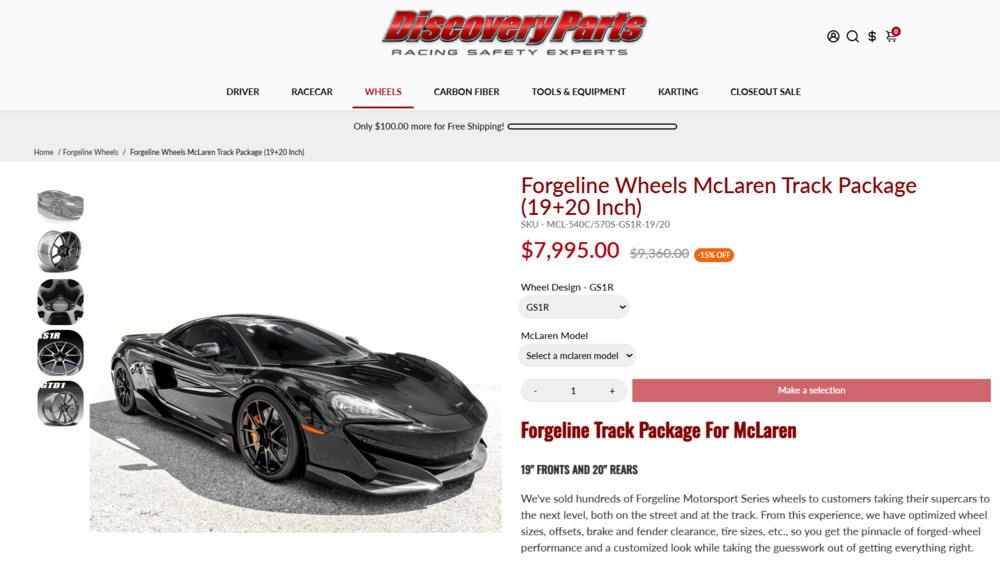
Product imagery affects ecommerce search and conversion because images help customers evaluate products and can also create visibility opportunities through image-based search and shopping experiences.
The fix: Multiple high-quality images from different angles, close-ups of key details, lifestyle images showing the product in use.
Mistake 15: Not Tracking or Understanding Traffic Quality
Increasing organic traffic is not an ecommerce SEO win if the traffic does not contribute to product discovery, conversions, revenue, or other meaningful customer actions.
One of the most common reporting mistakes I see is treating traffic growth as proof that SEO is working without asking which landing pages, products, categories, and queries are actually generating that growth.
The fix: Connect organic visibility to ecommerce outcomes. Look at organic revenue, conversion rate, product and category performance, customer acquisition cost where possible, and whether the searches driving growth actually align with the business.
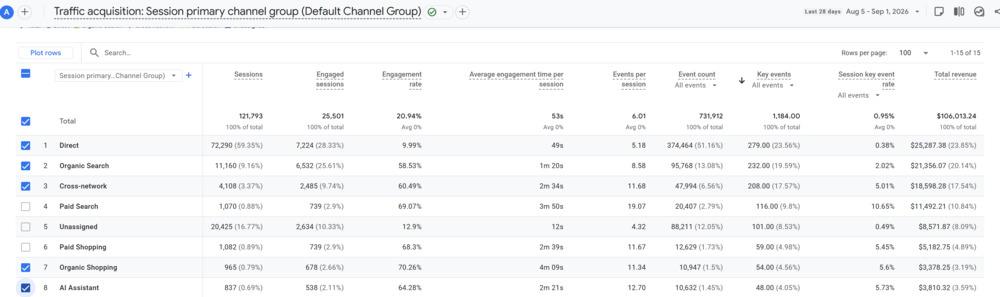
AI search is making that attribution even messier. I’m increasingly seeing this in ecommerce analytics: traffic attributed directly to AI assistants may still be relatively small, while organic search continues to drive substantial revenue. At the same time, Direct traffic can grow even as reported organic traffic declines.
That doesn’t necessarily mean search is contributing less. A customer may discover a brand or product in ChatGPT, Gemini, an AI Overview, or another AI search experience without clicking the citation. They may later search for the brand by name or go directly to the website. In GA4, that visit may ultimately appear as Organic Search or Direct rather than AI referral traffic.
That’s why I’m increasingly looking at organic revenue, branded search visibility, Direct traffic, and identifiable AI referrals together rather than treating each channel as an isolated customer journey. Attribution isn’t perfect, and in today’s search landscape, traffic alone can significantly understate the value of search visibility.
Priority Ranking: What Costs You the Most
Which Ecommerce SEO Mistakes Should You Fix First?
There is no universal order for fixing ecommerce SEO problems. Prioritization should depend on how widely the issue occurs, which products or categories it affects, current organic visibility, revenue potential, implementation effort, and whether the problem is preventing search engines or customers from accessing something important.
For example, missing Product schema on 20 products may matter less than a faceted navigation problem creating hundreds of thousands of crawlable URLs. A weak description on a low-volume product may matter less than an internally orphaned category responsible for a significant share of revenue.
How to Turn These Findings Into an Ecommerce SEO Plan
Start by identifying which problems actually exist and where they occur. Then prioritize them based on business impact rather than the order of this list.
I typically look at:
- How many URLs or templates are affected
- Whether important products or categories are involved
- Current organic visibility and revenue
- Whether the issue affects crawling, indexing, relevance, trust, or conversion
- Whether one template-level or programmatic fix could solve the issue at scale
- Development effort and internal resources required
The goal isn’t to check off 15 mistakes. It’s to identify which few issues are creating the biggest constraint on organic growth and address those first.
Ongoing:
- Monitor organic traffic and conversion rate
- Identify which products/categories are winning
- Build backlinks in small batches
- Continuously improve underperforming pages
The Bigger Picture
These 15 mistakes aren’t complex. They’re not mysterious. Collectively, these issues can create a meaningful drag on organic visibility and revenue, especially when the same problem is repeated across hundreds or thousands of ecommerce URLs.
Here’s why most stores keep making them: It’s easy to ignore SEO when you have short-term urgency.
You have a product launch deadline. You need to get sales this month. You need to hit Q3 revenue targets. So you focus on paid ads, email, social—the channels that deliver fast.
SEO gets the leftover time and budget.
But here’s the reality: SEO compounds. Every mistake you fix this month is still helping you next month. The product descriptions you improve keep converting. The internal links you add keep guiding customers and Google bots. The reviews you generate keep influencing decisions.
The goal isn’t a technically perfect ecommerce website. It’s a store where important products can show up, customers have enough information and trust to choose them, and organic visibility can be connected to measurable results.
That requires more than fixing isolated SEO errors. It requires understanding which issues are actually constraining growth and prioritizing the ones that matter most.
The question is: are you ready to fix them?
If you want a specific breakdown of which mistakes are costing your store revenue, let’s do an audit.
If you want to understand which ecommerce SEO issues are actually limiting your visibility or revenue, let’s look at the bigger picture. We can identify where the strongest opportunities may be and whether a deeper ecommerce SEO audit makes sense.

J. “Ivy” Boyter is the founder of Full Throttle SEO, a Florida-based SEO consultancy. With nearly 15 years of digital marketing experience, she helps businesses turn search visibility into qualified leads and revenue, with a focus on ecommerce SEO, technical audits, and visibility in AI-powered search. Her approach connects SEO priorities to business goals, helping brands show up, get chosen, and deliver results.
Outside of work, Ivy competes in autocross and rallycross, wrangles kids and chickens, and writes heartfelt marriage and parenting advice.