
Migrating an ecommerce website is not just a development project. It is also a revenue protection project.
When organic search is already driving meaningful traffic, transactions, and revenue, a poorly planned migration can put years of SEO progress at risk. URLs can change. Internal links can break. Important category pages can disappear. Redirects can point to the wrong places. Products can become harder for search engines to discover. Tracking can fail just when you need it most.
The good news is that losing SEO performance is not an inevitable part of an ecommerce migration.
You can migrate an ecommerce website without losing significant SEO visibility by identifying what is already creating value, preserving the signals that matter, carefully managing URL and structural changes, thoroughly testing the new site, and monitoring performance after launch.
The key is involving SEO before decisions are finalized, rather than bringing it in at the end for a post-launch checklist.
Why Ecommerce Website Migrations Can Hurt SEO
An ecommerce migration can involve considerably more than moving the same content from one platform to another.
Depending on the project, you may be changing:
- Ecommerce platforms or content management systems
- Domain names
- URL structures
- Site architecture and navigation
- Category and subcategory structures
- Product URLs
- Product variants
- Internal linking
- Faceted navigation
- Page templates
- Content
- Structured data
- Hosting infrastructure
- JavaScript implementation
- Analytics and conversion tracking
Every additional change creates another variable that search engines need to process and another opportunity for something important to be lost.
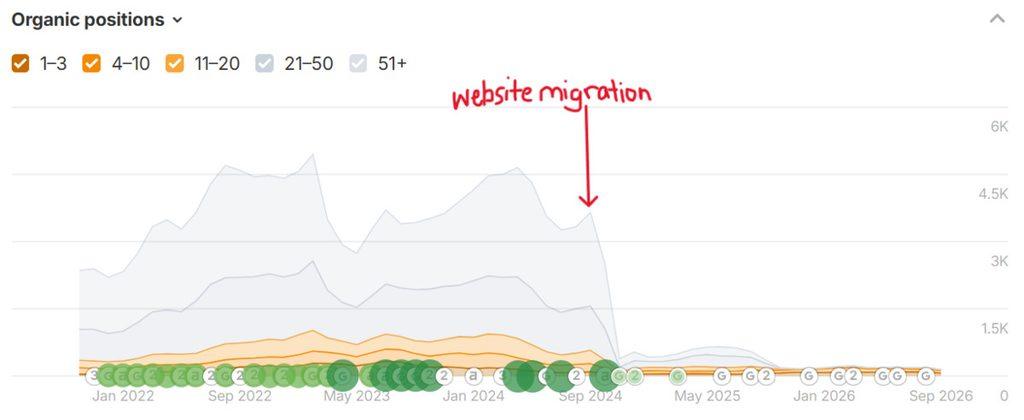
Some temporary ranking fluctuation can also be normal while Google crawls and processes changes. The goal of migration planning is not to eliminate losses (because short term dips are inevitable). Instead, we look to minimize unnecessary losses and give search engines clear signals about what has changed.
For ecommerce businesses, however, rankings aren’t the only metric that matters.
The real question is whether the migration protects the organic visibility, transactions, and revenue the business was generating before the move while creating a stronger foundation for future growth. And when I go into website migrations, I aim to shorten the cycle of uncertainty that Google feels about your changes.
That requires looking at SEO differently from the beginning.
Ways to Reduce SEO Losses When Migrating Ecommerce Websites
1. Establish Your SEO and Revenue Benchmarks Before You Migrate
Before changing anything, document what is working on the existing site.
A standard SEO audit is useful, but an ecommerce migration requires more context than a list of rankings and technical issues.
You need to understand which parts of the website actually contribute to the business.
At minimum, benchmark:
- Organic traffic
- Organic revenue and transactions
- Conversion rates
- Rankings for priority commercial searches
- Organic landing page performance
- High-performing category and subcategory pages
- High-performing product pages
- Content generating meaningful organic visibility
- Pages earning valuable external links
- Indexed pages
- Current site architecture and internal linking
- Crawl and indexing issues that already exist
This gives you something concrete to compare against after launch.
It also helps answer a much more important migration question:
Which pages and signals can we least afford to lose?
A category page generating substantial organic revenue deserves different attention from a URL that receives no traffic, earns no links, and provides little value to customers.
That doesn’t mean low-traffic pages should automatically disappear. It means migration decisions should be informed by business value and search value instead of treating every URL identically.
Don’t use the migration as an excuse to change everything
A migration often creates a long wish list.
New platform. New design. New URLs. New navigation. New category structure. New copy. New filters.
Doing all of those things simultaneously can make troubleshooting much harder if organic performance declines.
Ask whether each change is necessary for the migration itself or whether it can happen later.
If an existing URL structure works well and there is no compelling reason to change it, keeping it may remove an entire layer of migration risk.
Strategic restraint can be just as important as optimization.
2. Crawl and Inventory the Existing Ecommerce Site
You need a reliable record of the site before it changes.
Crawl the existing website and export the URLs and SEO elements you may need to preserve or compare.
At a bare minimum, I request to retain current URLs with SEO Titles, Meta Descriptions, and H1s.
Your inventory may include:
- Status codes
- Page titles
- Meta descriptions
- H1s
- Canonical URLs
- Indexability directives
- Internal links
- Image URLs
- Structured data
- Category pages
- Subcategory pages
- Product pages
- Blog and resource content
- Pagination
- XML sitemap URLs
- Original page content
Combine crawl data with analytics, Google Search Console, backlink data, and ecommerce performance data.
This creates a more complete picture than any individual tool can provide.
It can also reveal URLs that are valuable but easy to overlook during development.
For example, a buying guide may not generate transactions directly but may earn links, rank for valuable informational searches, and send customers into high-converting category pages.
Removing it because it isn’t a product or category page could destroy value the migration team never realized existed.
3. Decide What Should Stay, Change, Consolidate, or Disappear
A migration does not mean every old page needs an identical replacement.
It also doesn’t mean every old URL should simply be redirected somewhere.
Review your URL inventory and make an intentional decision for important pages.
Generally, a page may:
- Stay unchanged: The content and URL remain essentially the same.
- Move: The equivalent page exists on a new URL.
- Consolidate: Multiple old pages are being combined into one stronger page.
- Disappear: The page no longer has a useful equivalent.
This becomes particularly important for ecommerce catalogs.
Products are discontinued. Categories are renamed. Product lines are consolidated. Filters change. New merchandising structures are introduced.
The redirect strategy needs to reflect those realities rather than applying one rule across thousands of URLs.
4. Build the Redirect Map Before Launch
If URLs are changing, create the redirect map before the migration goes live.
Map old URLs to their closest relevant new destinations and use permanent server-side redirects, such as 301 or 308 redirects, when a page has permanently moved.
For example:
/old-category/ → /new-category/
is a logical redirect when the new category serves essentially the same intent.
But:
/discontinued-product/ → /
usually isn’t.
Redirecting hundreds or thousands of unrelated pages to the homepage isn’t a shortcut for preserving SEO value. Google specifically advises against redirecting many old URLs to an irrelevant destination because those redirects can be treated as soft 404s.
For ecommerce sites, review redirects at the page-type level:
- Category to category
- Subcategory to subcategory
- Product to equivalent product
- Consolidated product to the appropriate replacement
- Guide to corresponding guide
- Blog post to corresponding content
When content has genuinely been removed and there is no relevant replacement, returning an appropriate 404 or 410 can be better than forcing users and search engines to an unrelated page.
Avoid redirect chains
Old URLs should redirect directly to their final destinations wherever possible.
Avoid:
Old URL → Previous URL → New URL
when you can implement:
Old URL → New URL
Redirect chains create unnecessary hops for users and crawlers and make migration logic harder to maintain.
Google recommends keeping redirect chains low and directing users and crawlers to the final destination wherever possible.
Keep redirects in place
Don’t remove migration redirects a few weeks after launch because traffic appears stable.
Google recommends keeping site-move redirects in place for as long as possible, generally at least one year. From a user perspective, maintaining useful redirects even longer may make sense when old URLs continue receiving visits or external links.
5. Protect the Ecommerce Site Architecture
Redirects get a lot of attention during migrations, but site architecture deserves just as much.
Google uses links between pages to understand an ecommerce site’s structure and the relative importance of its pages.
A typical crawl path might look like:
Homepage → Category → Subcategory → Product
If the new platform changes that structure, important products or categories can become much harder to discover.
During staging, compare the new architecture with the existing site’s important organic landing pages.
Ask:
- Can search engines reach priority categories through crawlable links?
- Can they reach products through categories and subcategories?
- Have important pages become substantially deeper in the architecture?
- Have links to high-value categories disappeared from navigation?
- Are products only discoverable through an internal search function?
- Has JavaScript replaced crawlable links in important navigation elements?
A prettier navigation system isn’t necessarily a better search architecture.
The structure still needs to work for customers and search engines.
6. Preserve Important On-Page SEO Signals
A redesign can accidentally strip useful content and context from pages.
Compare important existing pages with their new versions.
Look specifically at:
- Page titles
- H1s
- Category copy
- Product information
- Internal links
- Breadcrumbs
- Image content and alt text where appropriate
- Canonical tags
- Structured data
- Indexability
This does not mean you can never improve the content during a migration.
But changing the URL, template, content, internal links, metadata, and page purpose simultaneously makes it much harder to understand what caused a performance change.
For your most commercially important organic landing pages, know exactly what is changing and why.
7. Pay Special Attention to Ecommerce URL Behavior
Ecommerce platforms can generate complicated URL ecosystems.
Products may be accessible through multiple categories. Filters and sorting options can create parameters. Product variants may create additional URLs. Pagination can change between platforms.
Before launch, understand how the new platform handles:
- Product variants
- Filters and faceted navigation
- Sorting parameters
- Pagination
- Tracking parameters
- Canonical URLs
- Duplicate content
- Category URLs
- Product URLs
Consistency matters.
Google recommends using consistent URLs across internal links, canonical tags, and XML sitemaps and using self-referencing canonicals on indexable ecommerce pages.
Don’t assume the new platform handles all of this correctly simply because it markets itself as SEO-friendly.
Test the actual implementation.
8. Validate Structured Data
Structured data can help search engines understand ecommerce content more accurately.
During a migration, check whether important structured data has been preserved and whether the new implementation reflects the content users can actually see.
Depending on the site, this could include structured data related to:
- Products
- Product variants
- Breadcrumbs
- Organization information
- Local business information where relevant
Validate templates rather than checking one product and assuming thousands of others behave the same way.
A migration is an excellent time to improve an outdated structured data implementation, but preservation comes first. Know what exists before replacing it.
9. Crawl the Staging Site Before Launch
One of the most valuable things an SEO team can do is crawl and QA the new website scanning for serious items to be fixed before launch.
Don’t wait until launch day.
The staging review should look for problems such as:
- Missing pages
- Broken internal links
- Incorrect redirects
- Incorrect canonical tags
- Accidental noindex directives
- Robots.txt problems
- Changed metadata
- Missing content
- Duplicate pages
- Incorrect status codes
- Missing structured data
- Broken pagination
- Crawl issues caused by navigation or JavaScript
- XML sitemap problems
Pay particular attention to the controls used to keep staging environments out of search results.
A site can be perfectly optimized and still disappear from search if a staging noindex directive or crawling restriction accidentally makes it into production and I’ve seen this happen a few times over the years.
10. Don’t Forget Analytics and Ecommerce Tracking
A migration can appear to have destroyed organic performance when the actual problem is broken measurement.
Before launch, confirm that analytics and ecommerce tracking work correctly on the new site.
Test:
- Analytics implementation
- Transactions
- Revenue
- Conversion events
- Checkout behavior
- Cross-domain tracking if applicable
- Consent-related tracking
- Google Search Console access
If your definition of migration success includes preserving organic revenue, you need reliable revenue data from day one.
This is another reason I don’t recommend judging an ecommerce migration exclusively by rankings.
A marketing director should be able to answer:
Are we still getting qualified organic traffic, are customers still converting, and is organic search still contributing revenue?
11. Create a Launch-Day SEO Checklist
Launch day is when planning becomes validation.
Once the new site is live, verify that what you approved in staging is actually what was deployed.
Priority checks should include:
- Important URLs return the expected status codes
- Redirects work correctly
- Redirects point directly to intended destinations
- Robots.txt isn’t blocking content that should be crawled
- Accidental noindex directives have been removed
- Canonicals reference the intended live URLs
- Internal links use the new URLs
- XML sitemaps contain the correct URLs
- Analytics and ecommerce tracking are recording correctly
- Priority category and product pages are accessible
- Structured data is functioning
- Google Search Console is configured appropriately
Then crawl the production website.
A successful staging crawl doesn’t guarantee a successful production deployment.
12. Update Internal Links Instead of Relying on Redirects
A 301 redirect is useful for old URLs, external links, bookmarks, and other references you don’t completely control.
Your own internal links are different.
Update them so they point directly to the new destination.
For example, don’t leave:
Category → Old Product URL → 301 → New Product URL
when you control the category link.
Change it to:
Category → New Product URL
Google recommends updating internal links after a site move based on your URL mapping.
This also gives you an opportunity to confirm that the internal linking structure still reflects the pages that matter most to the business.
13. Submit Updated XML Sitemaps and Monitor Indexing
Your XML sitemap should reflect the URLs you actually want search engines to discover and index on the new site.
After migration, submit the updated sitemap through Google Search Console and monitor how Google processes the new URLs.
For a domain migration, additional steps such as Google’s Change of Address tool may also apply.
Don’t treat sitemap submission as the finish line.
Watch what actually happens afterward.
Look for unexpected increases in:
- 404 errors
- Crawled but not indexed pages
- Duplicate URLs
- Canonicalization issues
- Blocked URLs
- Old URLs remaining indexed longer than expected
A sitemap helps discovery. It does not compensate for broken architecture, incorrect redirects, or indexability problems elsewhere on the site.
14. Monitor Organic Performance at the Page-Type Level
This is where your pre-migration benchmarks become valuable.
Some ranking fluctuation can occur while search engines crawl and process a significant site move. Google notes that medium-sized sites can take weeks or more to transition, with larger sites potentially taking longer.
That doesn’t mean every post-migration drop should be dismissed as normal.
Monitor performance closely enough to identify patterns.
Compare:
- Organic traffic before and after migration
- Organic revenue
- Transactions
- Conversion rate
- Priority keyword groups
- Category page performance
- Product page performance
- Content performance
- Indexed URLs
- Crawl errors
- Landing pages losing traffic
If organic traffic drops 20%, don’t stop at “traffic is down 20%.”
Find out where it is down.
If category traffic is stable but product traffic collapses, investigate product templates, internal linking, canonicalization, product availability, structured data, and indexing.
If traffic remains stable but organic revenue declines, investigate landing-page mix, conversion behavior, merchandising, and tracking.
Diagnosing migrations at the page-type and business-outcome level gives you considerably more useful information than watching a single sitewide traffic chart.
15. Measure Migration Success Against Business Outcomes
SEO migration success shouldn’t simply mean:
“Our rankings didn’t drop.”
A successful ecommerce migration should preserve the search equity the business has already built while creating a website capable of supporting future growth.
That means looking at:
- Organic visibility
- Qualified traffic
- Transactions
- Conversion rate
- Organic revenue
- Search visibility for important products and categories
- Customer experience
- Crawlability and indexability
- Future SEO opportunities
Sometimes a migration uncovers technical or architectural limitations that have been holding the old site back.
If those are addressed strategically, the migration can ultimately create opportunities for better performance than the website had before.
But first, protect what is already working.
What Real Ecommerce Migration Work Has Taught Me
One of the biggest lessons I’ve learned from ecommerce migrations is that success isn’t always about creating an immediate SEO increase.
Sometimes the win is protecting the visibility and business value you’ve already earned.
I recently helped migrate a small ecommerce website for a business that also relies on its website to generate visibility for local services.
SEO wasn’t something we waited to think about until after the new site launched. It was part of the migration process.
I reviewed the existing URLs to determine what needed to be preserved, redirected, or updated. We also did light keyword research and improved SEO elements such as page titles and meta descriptions so we weren’t simply carrying everything from the old site into the new one without considering how customers actually search.
There is still SEO work to complete after launch.
That’s an important point because a migration doesn’t need to include every possible SEO improvement on day one to be successful. The first priority is protecting the search equity the business has already built while creating a foundation we can continue improving.
What happened after the migration?
Early performance has been encouraging.
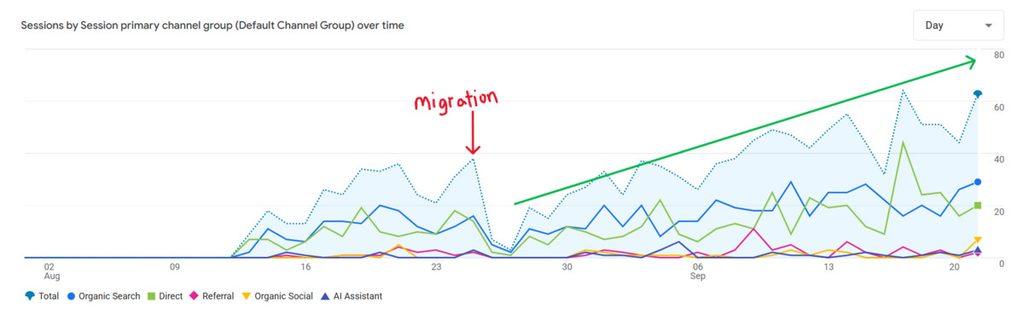
In one comparable 16-day period following the migration, Google Search clicks increased approximately 54%, from 107 to 165, while search impressions increased approximately 48%, from 15.7K to 23.2K.
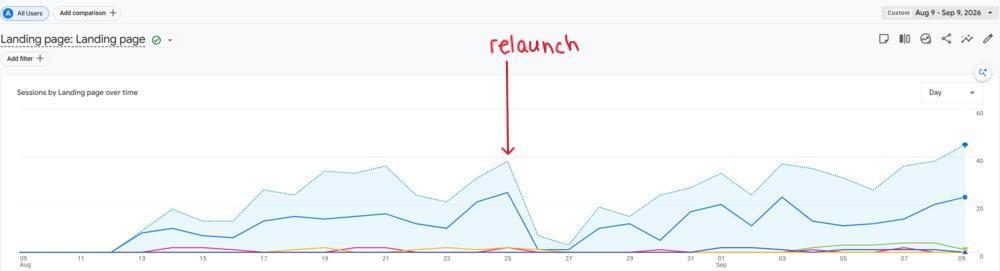
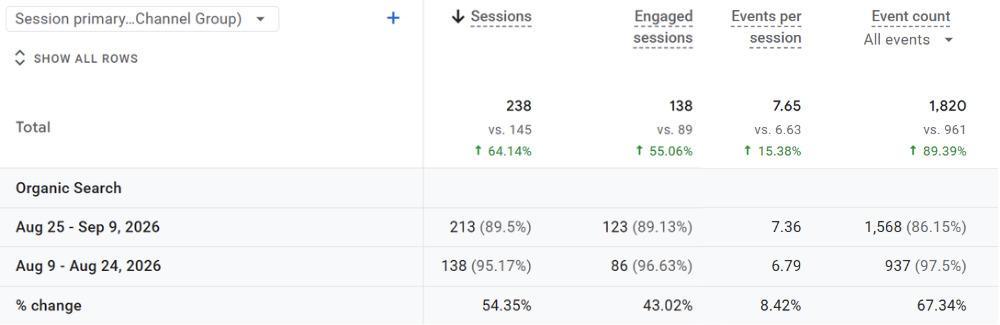
The analytics data tells a similar story. Organic search sessions increased 54%, from 138 to 213, while engaged organic sessions increased approximately 43%, from 86 to 123.
Visibility wasn’t limited to the homepage, either. Search Console showed new and migrated service, collection, and product URLs earning impressions and clicks after launch.
I’m careful about attributing every increase immediately following a migration to SEO work. There are too many variables involved, and this wasn’t a controlled experiment.
What matters to me at this stage is something simpler:
We didn’t launch the new website and then have to figure out where the organic visibility went.
Search visibility was preserved, Google was discovering the new and migrated pages, organic search continued bringing people to the website, and we had a foundation we could continue optimizing.
And we saw that before completing every post-launch SEO improvement on the list.
That’s a much better position to be in than spending the next six months trying to recover what was accidentally lost.
I’ve Seen What Happens When SEO Isn’t Involved
I’ve worked on the other side of migrations, too.
I’ve been brought into projects after a new website launched and organic traffic dropped because an SEO professional wasn’t involved in guiding the migration.
Those projects look very different.
Instead of building on the new website, the first job becomes forensic cleanup.
Which URLs used to rank? Where did they go? Which old pages had backlinks? Which URLs should have been redirected? What content disappeared? What changed in the site architecture?
Now someone has to hunt down old URLs, reconstruct what existed before the migration, implement redirects after the damage has already occurred, troubleshoot additional issues, and then wait for search engines to crawl and process those corrections.
I’ve seen companies spend six to twelve months dealing with traffic losses, cleanup, and recovery after migrations where SEO wasn’t adequately considered upfront.
And there is a business cost to that recovery period. It’s not just lost rankings on an SEO report. Depending on how much the company relies on organic search, lost visibility can mean lost traffic, leads, ecommerce sales, and revenue while the team works to recover.
Sometimes the ROI Is What You Don’t Lose
This is one of the harder parts of SEO to quantify.
If a business generates meaningful traffic, leads, or revenue from organic search and we successfully protect that visibility during a migration, there may never be a dramatic “SEO saved us” line on a report.
That’s the point.
The traffic didn’t disappear.
The marketing team didn’t spend months trying to determine why organic visibility collapsed.
Developers didn’t have to go back and reconstruct hundreds or thousands of old URLs after launch.
The business didn’t have to absorb months of potential lost opportunities while waiting for search engines to recrawl and reevaluate fixes that could have been handled correctly the first time.
Sometimes the value of SEO during a website migration isn’t measured by how much traffic you gain immediately. It’s measured by how much visibility, revenue, time, and recovery work you don’t lose.
That’s why I want SEO involved before an ecommerce migration launches, not after the traffic graph starts heading in the wrong direction.
Common Ecommerce Migration Mistakes to Avoid
Across the entire process, most migration problems come back to a handful of strategic mistakes:
- Bringing SEO into the project too late
- Changing URLs unnecessarily
- Failing to benchmark organic revenue before launch
- Redirecting old pages to irrelevant destinations
- Missing valuable category or product URLs
- Removing useful content during a redesign
- Changing architecture without considering internal linking
- Assuming the ecommerce platform handles technical SEO correctly
- Forgetting to remove staging crawl or indexing restrictions
- Launching without crawling the new site
- Failing to validate analytics and ecommerce tracking
- Measuring success only through rankings or sitewide traffic
- Assuming every post-launch decline will fix itself
Most of these aren’t advanced technical problems.
They are planning problems.
That’s why SEO needs a seat at the table while the migration strategy is being developed, not a QA ticket after development is complete.
Ecommerce SEO Migration FAQ
Will migrating an ecommerce website hurt SEO?
It can, but significant SEO losses are not inevitable. URL changes, redirects, internal linking, content, site architecture, indexability, and technical implementation can all affect organic performance. Careful planning and testing help reduce unnecessary losses. Some temporary ranking fluctuation may occur while search engines crawl and process a major site move.
Do I need 301 redirects when migrating an ecommerce website?
If permanent URL changes are part of the migration, old URLs should generally be permanently redirected to their closest relevant new destinations. Avoid redirecting unrelated URLs to the homepage or another generic page simply to eliminate 404s.
Should I change my URLs during an ecommerce migration?
Only when there is a good reason. A migration does not automatically require new URLs. If existing URLs perform well and the new platform can preserve them, keeping them can reduce migration complexity and risk.
How long should I keep ecommerce migration redirects?
Google recommends keeping site-move redirects for as long as possible, generally at least one year. Keeping useful redirects longer may benefit users who still encounter old URLs through bookmarks or external links.
How long does SEO take to recover after a website migration?
There is no universal recovery timeline because migration size and complexity vary. Google says small to medium sites can take several weeks for most moved pages to be processed, while larger sites can take longer. Rather than waiting for a predetermined recovery date, monitor indexing, priority landing pages, rankings, organic traffic, conversions, and revenue.
Should SEO be involved before the new ecommerce site is built?
Yes. Many of the decisions with the greatest SEO impact, including URL structure, site architecture, navigation, page templates, redirects, and content preservation, are made well before launch. Involving SEO early makes it easier to prevent problems rather than repair them afterward.
Protect What Works Before You Change It
An ecommerce migration shouldn’t be treated as a technical handoff followed by an SEO cleanup.
It should be planned around what the existing website already does for the business.
Know which pages drive visibility and revenue. Understand what search equity you’ve already built. Make deliberate decisions about what stays and what changes. Map redirects before launch. Test the staging environment. Validate the production deployment. Then monitor performance against the benchmarks that matter.
Most importantly, don’t define success solely as preserving rankings.
The objective is to make sure your business continues to show up, gives customers every reason to get chosen, and turns that visibility into measurable results after the new website goes live.
GET IN TOUCH
Let’s Talk About Your Ecommerce Migration Project

J. “Ivy” Boyter is the founder of Full Throttle SEO, a Florida-based SEO consultancy. With nearly 15 years of digital marketing experience, she helps businesses turn search visibility into qualified leads and revenue, with a focus on ecommerce SEO, technical audits, and visibility in AI-powered search. Her approach connects SEO priorities to business goals, helping brands show up, get chosen, and deliver results.
Outside of work, Ivy competes in autocross and rallycross, wrangles kids and chickens, and writes heartfelt marriage and parenting advice.