
Effective ecommerce keyword strategy is not about ranking for the largest possible number of keywords. It is about identifying the searches that reflect what customers actually want, mapping those searches to the right product, category, or supporting pages, and prioritizing opportunities that can contribute to product discovery and revenue.
Ecommerce stores can miss meaningful organic opportunities when they chase keywords with little business value, target searches that don’t match the page, or optimize around terminology their customers don’t actually use.
Then they wonder why increased rankings or traffic aren’t translating into organic revenue.
The real opportunity isn’t just ranking for more keywords. It’s being visible for the right keywords – those that match what customers are actually searching for, at the moment they’re ready to buy.
That’s what this guide is about.
Keywords aren’t some mysterious SEO tactic. They’re the bridge between what customers are looking for and what you’re selling. When you understand keywords strategically, you can:
- Show up where your customers are actually searching (Show Up)
- Understand what they want and create content that convinces them to buy from you (Get Chosen)
- Drive traffic that actually converts to revenue (Deliver Results)
Show Up. Get Chosen. Deliver Results.
This is the complete keyword strategy for ecommerce.
Contents
Why Keywords Actually Matter (And Why Most Stores Get It Wrong)
Before we get into the how, let’s be clear about why keywords matter to your business.
Keywords are intent signals.
Keywords can reveal what a customer is looking for, how specific that need has become, and where they may be in the buying process.
Someone searching “how to choose running shoes” has a different need from someone searching “men’s lightweight running shoes size 11.” The first search is primarily educational. The second is much more specific and may indicate that the customer is closer to evaluating or purchasing a product.
If you rank for “lightweight running shoes” but your page is generic information, the person who wanted to research bounces. The intent doesn’t match the content.
Conversely, if you ignore “lightweight running shoes” and only optimize for “running shoes,” you’re invisible to a huge segment of high-intent buyers who specifically want lightweight options.
This is where most ecommerce stores fail. They optimize for the broad, competitive keywords (like “running shoes”) because they sound important. Lower-volume, more specific searches can sometimes be disproportionately valuable because specificity often reveals more about what the customer actually wants.
That doesn’t mean broad keywords aren’t valuable. It means search volume alone shouldn’t determine which keywords deserve your attention.
Think about your own customers:
Are they searching “shoes”? Rarely. Are they searching “red lightweight running shoes size 11”? All the time.
The keyword strategy that works is the one that meets customers where they are … that is, searching for the specific thing they want to buy.
The Research Foundation: Finding Keywords Your Customers Actually Search For
Ecommerce keyword research combines search data with what you already know about your products, customers, margins, buying behavior, and business priorities. Search volume tells you what people search for. It does not tell you by itself which searches are most valuable to your business.
Step 1: Start With What You Know
Before you use any tools, start with what you know about your business.
List your main product categories. For each one, ask: What terms would a customer use to find this?
Don’t filter or overthink. Just brainstorm.
Example for a running shoe store:
Red running shoes, Lightweight running shoes, Men’s red sneakers, Track shoes, Running footwear, Speed running shoes, Professional running shoes, Women’s running shoes, Running shoes for beginners, Best running shoes for marathons, Cushioned running shoes, Minimalist running shoes
You’ll refine this list later. Right now, you’re just getting what’s in your head out of your head.
Step 2: Use Search Data to Validate
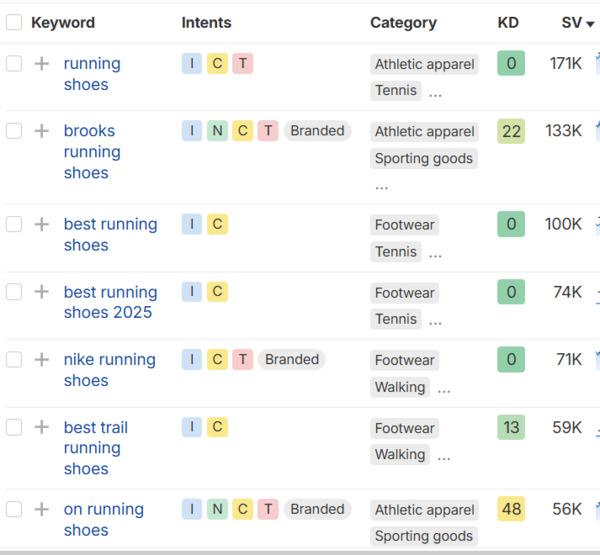
Now use tools to find out what people are actually searching for:
Google Search Console (Free) – Google Search Console shows many of the queries for which your website is already receiving impressions and clicks. That makes it especially useful for identifying existing visibility, unexpected search demand, and pages that may already be close to stronger organic performance.
You’re not guessing, you’re looking at real data.
Go to Search Console, click “Queries,” and sort by impressions. You’ll see hundreds of searches you probably didn’t optimize for. Some of these might be goldmines.
Google Autocomplete (Free) Start typing a keyword into Google Search. See what Google suggests. Google Autocomplete can help uncover the language and related searches Google predicts may be relevant as users type. Use it for discovery, not as proof of search volume or commercial value.
Google Trends (Free) See if a keyword is growing, stable, or declining. You want to rank for keywords that are growing or stable, not dying.
Keyword Tools (SEMrush, Ahrefs) These paid tools show you:
- Search volume (how many people search this per month)
- Keyword difficulty (how hard it is to rank, on a 0-100 scale)
- Search intent (is this person looking to buy, learn, or find a specific brand?)
- Cost per click (how much competitors bid on this in paid ads—higher CPC often means higher commercial value)
For ecommerce, I recommend starting with one paid tool. Either Semrush or Ahrefs will give you what you need.
Step 3: Research What Your Competitors Are Already Showing Up For
Your own search data tells you where you already have visibility. Competitor research can help uncover opportunities you may not have considered yet.
I use Ahrefs to look at the keywords competing ecommerce sites are already ranking for, the pages earning that visibility, and where there are gaps between what competitors are showing up for and what my client’s site currently covers.
That doesn’t mean blindly copying a competitor’s keyword strategy. A competitor may rank for searches that aren’t relevant to your products, customers, margins, or business priorities.
Instead, look for:
- Keywords multiple relevant competitors are consistently showing up for
- Product or category searches where competitors have visibility and you don’t
- Competitor pages generating meaningful organic traffic
- Searches where your site already ranks but competitors are outperforming you
- Product attributes, use cases, problems, or customer questions you may not currently address
- Opportunities where your products or expertise could provide a better result
Ahrefs’ Organic Keywords, Top Pages, Competing Domains, and Content Gap reports can all help with this research.
The goal of competitor keyword research isn’t to find everything your competitors rank for. It’s to identify relevant search demand your own research may have missed and decide whether those opportunities make sense for your business.
Step 4: Understand and Prioritize the Keywords You Find
By this point, you may have keywords from your own business knowledge, Search Console, keyword research tools, and competitor analysis. Now you have to decide which opportunities are actually worth pursuing.
For each keyword, ask:
How many people search this? More volume = more potential traffic, but usually more competition. You want a mix of high-volume and lower-volume keywords.
How competitive is the search result? Keyword difficulty scores from SEO platforms can provide useful directional information, but they should not be treated as universal thresholds. Evaluate the actual search results, competing domains, page types, content quality, brand strength, and your site’s existing authority before deciding whether an opportunity is realistic.
What does the searcher want? This is the critical question. Are they trying to buy? Learn? Find a specific brand? More on this next.
How valuable is this keyword? A keyword with 500 monthly searches might be worth more than one with 5,000 searches if it’s a transactional keyword (someone ready to buy) vs. informational (someone just learning).
The Critical Question: What Is the Search Intent?
This is the most important concept in keyword strategy.
Search intent = What the searcher actually wants from the result.
Different searches have different intents. Miss this, and you’ll rank for keywords that don’t drive conversions.
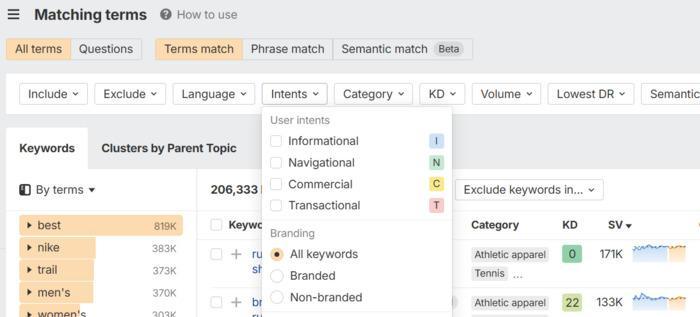
The 4 Types of Search Intent
Search intent describes what a searcher is trying to accomplish. Ecommerce searches are commonly grouped into informational, navigational, commercial, and transactional intent, although real searches don’t always fit neatly into a single category.
Informational Intent
The searcher wants to learn something.
Examples: “How to choose running shoes,” “Best running shoes for flat feet,” “What’s the difference between road and trail shoes?”
Person is researching. Not ready to buy yet.
Best for: Blog content, guides, educational content
Value for ecommerce: Lower immediate conversion, but builds authority and brings customers in at the top of the funnel. These people might buy later.
Navigational Intent
The searcher is looking for a specific brand or company.
Examples: “Nike running shoes,” “Acme shoes online,” “where to buy Asics”
Person knows what they want, just needs to find it.
Best for: Your brand’s own pages
Value: Medium (they’re already aware, but might choose a competitor)
Commercial Intent
The searcher is researching before buying. They’re comparing options.
Examples: “Best lightweight running shoes,” “Running shoes comparison,” “Running shoes with best reviews”
Person is close to buying. Still deciding between options.
Best for: Category pages, comparison content, buying guides
Value: Very high (they’re ready to buy, just deciding where)
Transactional Intent
The searcher is ready to buy now.
Examples: “Buy red running shoes,” “Red running shoes size 10,” “Discount running shoes”
Person has made a decision and is looking for where to complete the purchase.
Best for: Product pages, shopping feeds
Typical ecommerce role: Strong purchase potential because the searcher is often closer to a transaction.
Why This Matters for Your Strategy
For ecommerce brands focused on near-term organic revenue, commercial and transactional searches often deserve early attention because they are closer to the purchase decision.
Informational searches still matter when they support product discovery, answer questions that influence a purchase, strengthen topical authority, or introduce customers to the brand earlier in their research.
The biggest takeaway I’ve seen in analyzing keyword intent is to not rely on Ahrefs or AI recommendations. View the actual search engine results pages (SERPs) for individual keywords to determine what Google is ranking highest. If category pages are primarily ranking on the first page, this should indicate that it is not likely a great term for a blog post.
Organizing Your Keywords: The Cluster Strategy
You’ve now got a list of keywords. How do you organize them?
Clustering.
An ecommerce keyword cluster is a group of related searches that can reasonably be satisfied by the same page because they share similar meaning and search intent. Keyword clustering helps determine whether searches belong on one product or category page or require separate pages to satisfy different customer needs.
Clustering helps you:
- Understand which pages you need to create
- Prevent your own pages from competing with each other
- Identify internal linking opportunities
- Show Google that your site is authoritative on a topic
How to Cluster
Group keywords by topic and intent. Identify which keywords are primary (broad, high volume) and which are secondary (specific variations).
Whether “lightweight running shoes” deserves its own subcategory cannot be determined from the keyword alone. Look at search results, product assortment, customer demand, and whether your store has enough relevant products to create a genuinely useful destination.
Some possible clustering (but check the SERPs to verify):
Example: Running Shoes Cluster
Primary keyword: “running shoes” Secondary keywords: “lightweight running shoes,” “best running shoes for speed,” “professional running shoes” Long-tail keywords: “lightweight running shoes under 7oz,” “professional running shoes size 10,” “red running shoes for women” Related keywords: “track shoes,” “distance running,” “shoe cushioning,” “athletic footwear”
Which page should rank for this cluster? A category page for all running shoes.
Example: Red Running Shoes Cluster
Primary keyword: “red running shoes” Secondary keywords: “red lightweight running shoes,” “professional red running shoes” Long-tail keywords: “red running shoes size 10 men’s,” “red running shoes women’s,” “red track shoes” Related keywords: “professional shoes,” “competitive running,” “track performance”
Which page should rank for this cluster? A subcategory or product page for red running shoes specifically.
Example: Lightweight Running Shoes Cluster
Primary keyword: “lightweight running shoes” Secondary keywords: “best lightweight running shoes,” “light running shoes” Long-tail keywords: “lightweight running shoes for women,” “lightweight running shoes under 7oz,” “lightweight marathon running shoes” Related keywords: “minimal weight,” “fast running,” “responsive shoe,” “distance running”
Which page should rank for this cluster? Another subcategory or product page focused on lightweight options.
The insight: These are three different clusters, each for a different page. Each cluster targets a different search intent. You’re not competing with yourself.
If you had tried to put all of these keywords on one page, you’d confuse Google about what the page is really about. Each cluster has a clear primary topic.
Placing Keywords Where It Matters Most
Okay, so you know which keywords you want to rank for. Where do they actually go on the page?
Where and how you use keywords can help clarify what an ecommerce page is about, but keyword placement is only one part of relevance.
Your primary topic should be clear in the places customers and search engines naturally use to understand a page, including the title, main heading, product or category copy, images, internal links and other supporting context. The goal isn’t to check off keyword placements. It’s to make the page unmistakably clear about what it offers.
The following tiers provide a practical order for thinking about where keyword and topical relevance naturally appear on an ecommerce page. They are not a Google ranking-factor hierarchy, and you don’t need to force an exact-match keyword into every location.
The Hierarchy: Tier 1
Title Tag
Your title tag is one of the clearest signals describing the primary topic of a page, and it can also influence whether someone chooses your result when it appears in search.
Include the primary product or category topic naturally in the title when it accurately describes the page. You can also use relevant attributes, benefits or brand information when they help differentiate the result.
A useful starting structure might be:
[Primary Product or Category] – [Important Attribute or Benefit] | [Brand]
Example: “Lightweight Running Shoes for Speed | Acme Running”
Don’t force the keyword into the beginning simply because an SEO rule told you to. Lead with the information most useful for identifying the page and matching the searcher’s intent.
WRONG: “Find the Best Running Shoes for Speed and Comfort at Acme” RIGHT: “Lightweight Running Shoes for Speed – Men’s & Women’s | Acme”
Tier 2: Meta Description
Your meta description can help a potential customer understand what they’ll find on the page and why your result may be worth clicking.
Meta descriptions are not a direct ranking factor, and Google may rewrite them based on the search. But that doesn’t make them unimportant. For important ecommerce pages, they are an opportunity to communicate relevance and give the searcher a reason to choose your result.
Describe what the page actually offers using the language a customer would expect. When appropriate, include an important differentiator such as product selection, shipping, availability, materials or another genuine selling point.
Example: “Shop lightweight running shoes engineered for competitive speed. Multiple sizes and styles available with free shipping on orders over $50.”
One word of caution though: Google is re-writing Titles and Meta Descriptions in search result pages, so one trick I use is to increase the length of the meta description (slightly longer than the “recommended” character count) to give Google a fair amount of content to work with so it’s less likely to choose sub-par details to display in search.

If you’re running audit tools that flag “Title too long” or “Meta description too long” just know that this is based on outdated rules that, while generally still apply (Google won’t show more than a certain number of characters in search), the more information we put into these fields, the more information we’re giving to Google about what is most accurate about the page.
With Google rewriting them anyway, it really doesn’t matter how much you put into the text fields, but know that we always recommend putting the most important keywords toward the beginning of the Title tag just to be safe.
Tier 3: H1 (Page Heading)
Your main page heading should make it immediately clear to customers what product, category or topic the page covers.
The H1 does not need to be an exact-match keyword. It should accurately describe the page and will often naturally include the primary product or category terminology customers use when searching.
For ecommerce sites, clarity is more important than trying to engineer a perfectly optimized heading.
Example: “Men’s Lightweight Running Shoes for Competitive Athletes”
Tier 4: Opening Content
Make the subject and value of the page clear early. Customers and search systems shouldn’t have to work through several paragraphs before understanding what product or category the page covers, who it is for or why it may be relevant.
That will often mean using the primary product or category terminology naturally near the beginning, but there is no “first 100 words” requirement.
For important explanatory or answer-focused content, semantic specificity can also make the passage easier to understand on its own.
Instead of:
“These are designed for runners who want more speed. They’re lightweight and responsive.”
Consider:
“These lightweight running shoes are designed for competitive runners who want a responsive shoe built for speed.”
The second version isn’t better because it repeats a keyword. It’s better because the subject is clear even if the sentence is separated from the surrounding copy.
Example: “The Red Running Shoe is engineered for competitive runners who need lightweight footwear with maximum responsiveness. If you’re looking for running shoes that prioritize speed, this is it.”
Notice the keyword appears twice here, but naturally, not forced.
Tier 5: Throughout the Content
Once the page’s primary topic is clear, supporting content should naturally expand the context around it.
That may include product attributes, materials, features, use cases, compatibility, customer questions, comparisons and other terminology relevant to how customers evaluate the product.
There is no ideal keyword density and no reason to repeat an exact phrase a predetermined number of times. Use the language customers use where it helps communicate meaning.
This becomes especially important in content that directly answers customer questions. If a sentence may be useful on its own, name the subject clearly rather than relying too heavily on “it,” “this” or “they.”
That’s not keyword stuffing. It’s semantic specificity.
The goal is still the same: write naturally for the person evaluating your product while making the meaning clear enough for search systems to understand.
Tier 6: Image Alt Text
Alt text should accurately describe the purpose or content of an image for people who cannot see it. For product imagery, that description will often naturally include the product name, type, color, material or other visible attributes that are also relevant to search.
Don’t add a keyword simply because you want another place to use it. Describe what is actually shown.
Example: “Red lightweight running shoe with white sole and responsive cushioning.”
Descriptive alt text supports accessibility while also giving search engines useful context about product images.
Example: “Red lightweight running shoes with responsive cushioning”
Need to programmatically implement alt text site wide?
Consider software that will implement alt text automatically.
Tier 7: Internal Link Anchor Text
Internal link anchor text provides context about the page you’re linking to and helps customers understand where the link will take them.
Use descriptive anchor text when it fits naturally rather than generic phrases such as “click here.”
For example:
“Explore our lightweight running shoes” is more useful than “click here to view more.”
Across an ecommerce site, these contextual links also help establish relationships between products, categories and supporting content. You do not need every internal link to use the exact same keyword. Natural variation is expected.
Tier 8: URL
A descriptive URL can help customers and search engines understand where a page fits within the site, but URLs should be designed primarily for clarity, consistency and long-term maintainability.
When you’re creating a new page, a short descriptive URL is generally preferable:
/red-running-shoes/
rather than:
/product/12345/
But don’t change an established URL simply to add a keyword. The SEO risk and redirect requirements involved in changing existing URLs can outweigh any minor benefit from creating a more descriptive slug.
Avoiding the Keyword Stuffing Trap
Here’s where most people mess up.
They think: “If one mention of ‘lightweight running shoes’ is good, five mentions is better.”
No.
Google’s AI can detect unnatural language. It can tell when you’ve optimized a page for robots instead of humans.
Keyword stuffing looks like this:
“Lightweight running shoes are shoes for running. Our lightweight running shoes are the best lightweight running shoes for runners who want lightweight shoes. Buy lightweight running shoes today.”
This is obviously awkward. But people write like this all the time, thinking it’ll help rankings.
It doesn’t. It hurts rankings. And it kills conversion rate because it sounds terrible.
The test: Read your content out loud.
If it sounds natural, it’s good. If you hear yourself say something awkward, rewrite it.
Your content should be written for humans first. Keywords should fit naturally into that human-written content.
There is no ideal keyword density for an ecommerce page. Use the terminology customers use when it helps describe the product accurately, but don’t repeat an exact phrase simply to reach a target count.
Semantic specificity is more useful than repetition. If a sentence clearly explains the product, attribute, use case, or customer need, you shouldn’t need to keep repeating the same keyword to reinforce relevance.
This isn’t about hiding keywords. It’s about being natural.
“Lightweight running shoes” + “running shoes” + “fast shoes” + “responsive footwear” + “speed-focused design” = you’ve used several keyword variations without overusing any one phrase.
Keyword Variations: Why They Matter
Different customers search for different things.
Some search “running shoes.” Some search “athletic shoes.” Some search “training sneakers.” Some search “footwear for running.”
They all mean the same product. But they’re different search queries.
Google understands semantic relationships. It knows “running shoes” and “athletic footwear” are related. But it ranks differently for each.
Your content should include natural variations of your primary keyword, not just repeat the exact phrase.
Strategic Variation
Instead of: “Red running shoes. Red running shoes are the best. Buy red running shoes now.”
Try: “Red running shoes for competitive athletes. These shoes combine the lightweight feel of athletic footwear with the responsiveness runners need. If you’re looking for footwear that prioritizes speed, this is it.”
You’ve used the primary keyword once (“red running shoes”), then used related terms (“athletic footwear,” “runners,” “footwear”) naturally.
Build Semantic Context Naturally
Strong ecommerce content naturally includes the terminology needed to describe a product accurately: materials, features, use cases, dimensions, compatibility, benefits, customer concerns, and related product concepts.
You don’t need a list of “LSI keywords.” You need enough relevant context for customers and search systems to understand exactly what the page is about.
Measuring Whether Your Keyword Strategy is Actually Working
A keyword strategy is only useful if it contributes to meaningful visibility and business results.
Measuring ecommerce keyword performance requires looking at search visibility and onsite performance together. Google Search Console can show which queries generate impressions and clicks, while Google Analytics 4 can show what organic visitors do after they reach your site, including conversions and revenue. Because those systems do not provide perfect query-to-revenue attribution, keyword performance should also be evaluated alongside landing page, product, and category performance.
Metrics That Matter
Search Visibility
Start by looking at whether your important products and categories are becoming more visible for the searches you intentionally targeted.
In Google Search Console, monitor:
- Impressions
- Clicks
- Click-through rate
- Average position
- Queries associated with important landing pages
Don’t focus too heavily on a single ranking position. Look for broader patterns. Is the page appearing for more relevant searches? Are impressions and clicks increasing? Are the queries becoming more aligned with the products or categories you actually want to sell?
Organic Traffic
Next, look at whether increased search visibility is translating into qualified organic traffic.
GA4 can show which landing pages organic visitors enter through and what they do after arriving. Search Console provides the query data that led to clicks from Google Search.
Used together, they can help you determine whether keyword improvements are attracting the audience you intended, even though they cannot provide perfect keyword-level attribution.
Click-Through Rate (CTR)
Search Console shows click-through rate for the queries and pages appearing in Google Search.
CTR can help identify situations where a page is earning visibility but not attracting clicks. But don’t rely on universal benchmarks. CTR varies significantly based on position, search intent, SERP features, brand recognition, device, and the query itself.
If impressions are growing without corresponding clicks, review the actual search results and consider whether the title, snippet, page positioning, or search intent could explain the difference.
Conversions
Visibility and traffic are only part of the story. The next question is whether organic visitors take meaningful actions after reaching the site.
Depending on the business, that might include:
- Product purchases
- Add-to-cart activity
- Checkout starts
- Email signups
- Quote or contact requests
- Other meaningful ecommerce events
A lower-volume search opportunity can be more valuable than a higher-volume one when it attracts better-qualified customers or supports stronger conversion performance. Search volume is only one input into keyword prioritization.
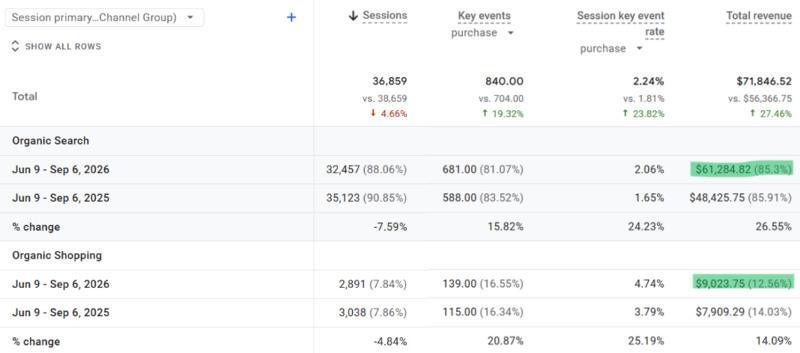
Organic Revenue
For ecommerce, revenue should remain one of the primary measures of whether organic search is contributing to the business.
GA4 ecommerce tracking can show revenue associated with organic traffic, while landing page and product-level reporting can help identify which parts of the site are contributing to those results.
You generally cannot draw a clean line from an individual organic keyword to a specific dollar amount. Attribution has limitations, and customer journeys increasingly cross multiple searches, channels, devices, and discovery platforms.
That doesn’t mean you stop measuring. It means you look at the evidence together: search visibility, organic landing pages, conversions, revenue, and broader performance trends.
A keyword that generates traffic but little measurable business value deserves scrutiny. It may still support an earlier stage of the customer journey, but traffic alone isn’t enough reason to keep investing in it.
Tools for Tracking Ecommerce Keyword Performance
Google Search Console
Use Search Console to understand how your site performs in Google Search, including queries, impressions, clicks, CTR, average position, and the pages earning that visibility.
Google Analytics 4
Use GA4 to understand what organic visitors do after they arrive, including engagement, conversions, ecommerce purchases, and revenue.
SEO Platforms
Tools such as Semrush, Ahrefs, and Moz can supplement first-party data with rank tracking, competitor visibility, keyword research, and broader SERP monitoring.
Data Studio (formerly Looker Studio) and Reporting Dashboards
Data Studio or other reporting platforms can bring Search Console, GA4, and other data together so you can evaluate search visibility alongside actual business performance.
The goal isn’t to prove that a keyword “worked” because it moved from position 12 to position 5. The goal is to understand whether stronger visibility for the searches that matter is helping more of the right customers find your products and contributing to meaningful business results.
How to Prioritize an Ecommerce Keyword Strategy
Keyword opportunities should be prioritized based on business value, existing visibility, search intent, competitive feasibility, and the importance of the products or categories involved. There is no universal three-month keyword roadmap that makes sense for every ecommerce store.
I would typically look for the intersection of:
- Products and categories that matter to revenue
- Existing rankings or impressions that suggest an opportunity
- Search intent that aligns with what the page offers
- Realistic competitive opportunities
- Gaps where customers are searching for something the site does not currently address well
- Pages that could improve substantially without requiring a major rebuild
The best opportunity may be a new category page. It may be improving an existing product page. Or it may be realizing that a keyword with impressive search volume isn’t worth pursuing at all.
The Real Opportunity
The biggest ecommerce keyword opportunities aren’t necessarily the searches with the highest volume. They’re the searches where customer demand, business value, search intent, and your ability to provide the right result intersect.
The stores winning at organic search aren’t necessarily optimizing for the most keywords. They’re making better decisions about which searches matter, which pages should satisfy them, and which opportunities are actually worth pursuing.
Start with research. Understand intent. Cluster strategically. Place keywords where they matter. Avoid stuffing. Measure results.
That’s the complete keyword strategy.
Ready to audit your current keyword strategy and identify the high-value keywords you’re missing? Let’s review your top products and show you where the real revenue opportunity is. Schedule a free ecommerce SEO consultation.

J. “Ivy” Boyter is the founder of Full Throttle SEO, a Florida-based SEO consultancy. With nearly 15 years of digital marketing experience, she helps businesses turn search visibility into qualified leads and revenue, with a focus on ecommerce SEO, technical audits, and visibility in AI-powered search. Her approach connects SEO priorities to business goals, helping brands show up, get chosen, and deliver results.
Outside of work, Ivy competes in autocross and rallycross, wrangles kids and chickens, and writes heartfelt marriage and parenting advice.