
Ecommerce category pages sit at the intersection of SEO, merchandising, user experience, and revenue. That’s exactly why treating them like keyword-targeted product grids leaves so much opportunity on the table.
I’ve spent a lot of time recently auditing ecommerce sites, and category pages are one of the areas where the difference between “SEO best practices” and what actually matters to the business becomes obvious.
I don’t evaluate a category page based only on whether it ranks. I want to know whether search engines can reliably discover and understand it, whether it attracts the right search demand, whether shoppers can find the products they need, and whether improving the page has realistic revenue potential.
A category page ranking for a high-volume keyword isn’t necessarily a successful category page. If the inventory doesn’t match the search intent, important products are difficult to discover, or the traffic never converts, increased visibility isn’t accomplishing much.
Ecommerce category page SEO is the process of optimizing category and collection pages so they can earn visibility for commercially relevant searches while helping shoppers find and choose the right products.
The strongest category pages do three things well (from my Show Up. Get Chose. Deliver Results Framework):
Show Up: Give search engines and AI tools a clear, crawlable understanding of the category and the products within it.
Get Chosen: Help shoppers understand their options, compare products, and confidently narrow the selection.
Deliver Results: Move qualified organic visitors toward products and purchases.
This guide shows you how to build category pages around all three.

Why Category Pages Matter More Than You Think
Category pages often deserve more attention than their URL count suggests because they can sit at an important point between broad product discovery and an individual purchase decision.
But I wouldn’t prioritize them simply because category keywords tend to have higher search volume.
I’ve seen this play out in actual ecommerce campaigns, where stronger commercial intent and structural improvements produced revenue growth even when overall keyword visibility didn’t move in the same direction.
How I Evaluate Ecommerce Category SEO Opportunities
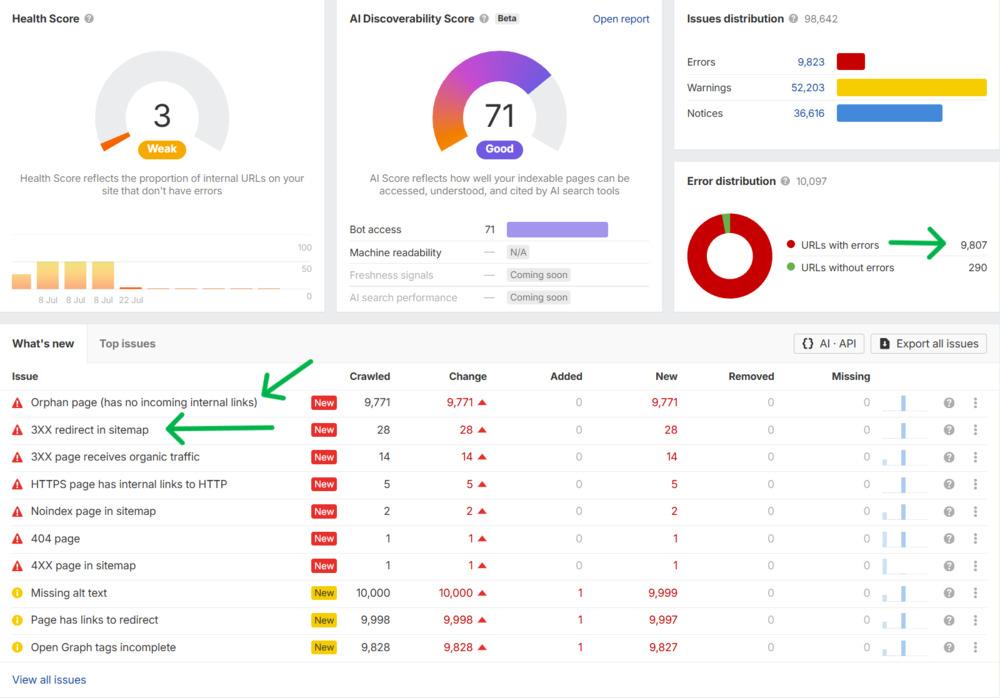
When I audit an ecommerce site, I don’t automatically prioritize the categories with the highest search volume or even the ones with the biggest visibility declines.
I look at the business opportunity and the SEO constraint together.
That means asking:
- Is this category already generating organic revenue or conversions?
- Does the business have enough inventory to capitalize on additional demand?
- Are commercially important products buried too deep in the site?
- Are crawlability, internal linking, faceted navigation, rendering, or indexation limiting visibility?
- Are competitors capturing searches that align with products the business actually wants to sell?
- Does the category convert well enough to justify investing more resources into it?
- Are margins or strategic product priorities making this category more valuable than search volume alone would suggest?
This is something ecommerce technical audits and client communications have reinforced for me. The biggest keyword opportunity and the biggest business opportunity are not always the same thing.
A lower-volume category with healthy inventory, strong margins, good conversion potential, and a fixable SEO constraint may be a much better investment than chasing the highest-volume category in the catalog.
Search volume tells you where demand may exist. It doesn’t tell you where the best organic revenue opportunity exists.
Category Pages Help Define the Relationships in Your Catalog
One of the things I look for in ecommerce technical audits is whether the site architecture actually communicates the relationships the business assumes are obvious.
A business may think of its structure as:
Running Shoes → Trail Running Shoes → Women’s Trail Running Shoes → Individual Products
But that relationship is only useful to search systems if the site makes it discoverable through crawlable navigation, internal links, breadcrumbs, URLs and page content.
This is a problem I continue to find in ecommerce technical audits.
The category or product page exists. It may be indexable. It may even be included in the XML sitemap. But when I trace how search engines and shoppers are actually supposed to reach it through the site, the internal path is weak, inconsistent, or almost nonexistent.
That’s why I don’t evaluate ecommerce architecture by looking at URLs in isolation.
I look at how categories, subcategories, filters, pagination, navigation, breadcrumbs, contextual links, and product links work together to communicate the structure of the catalog.
I’ve also seen what happens when those relationships are strengthened. Better navigation and contextual internal linking can make important categories and products easier for shoppers to discover while giving search engines clearer signals about how the catalog fits together.
The goal isn’t to manufacture internal links for SEO. It’s to make the relationships the business already understands about its products equally clear to customers and search systems.
This ecommerce case study shows one example.
When those relationships aren’t clear, it creates two problems.
First, traditional search engines have a weaker path for discovering and understanding important commercial pages.
Second, AI-driven search systems have less clear site context to draw from when they are trying to understand what a business sells, how products relate, and which page best answers a specific shopping need.
Strong category architecture helps create that context.
Clear site architecture, descriptive internal links, breadcrumbs and crawlable product links reinforce those relationships. That doesn’t mean optimizing one category page automatically pushes every product beneath it higher. It means you’re giving search systems clearer context instead of asking them to interpret a disconnected collection of URLs.
Category Pages Have to Serve Searchers and Shoppers
Someone landing on a category page usually has a different job to do than someone landing on a specific product page.
They’re still narrowing the decision.
They may need to compare brands, sizes, specifications, price points, styles, applications, or other attributes before they know which product is right for them.
That means category page SEO can’t stop at getting the page indexed and ranking.
If the page earns the click but shoppers struggle to filter the selection, understand their options, or identify the next step, you’ve solved the visibility problem without solving the business problem.
A strong category page connects those two jobs: help search engines understand what the page offers and help shoppers find the product they’re most likely to buy.
The 5-Layer Category Page Framework
An optimized category page is built in layers. Each layer serves a specific purpose.
Layer 1: Make the Category Purpose Unmistakable
The title tag, H1, breadcrumb trail and introductory copy should reinforce the same basic idea: what products belong here and what shopping need does this category serve?
That doesn’t mean repeating the exact keyword everywhere.
If a category targets “women’s waterproof hiking boots,” search engines and customers should be able to understand that purpose quickly from the page title, heading, navigation and products shown.
I also look for mismatches.
If the title says one thing, the H1 says another, the breadcrumb places the page somewhere unexpected and half the products don’t fit the category intent, rewriting the title tag isn’t the real SEO fix.
The page itself needs to make sense as a category.
For AI-driven search, that clarity becomes even more useful because systems may retrieve individual passages or page elements when answering much more specific questions than the original keyword.
Layer 2: Introductory Content That Helps Shoppers
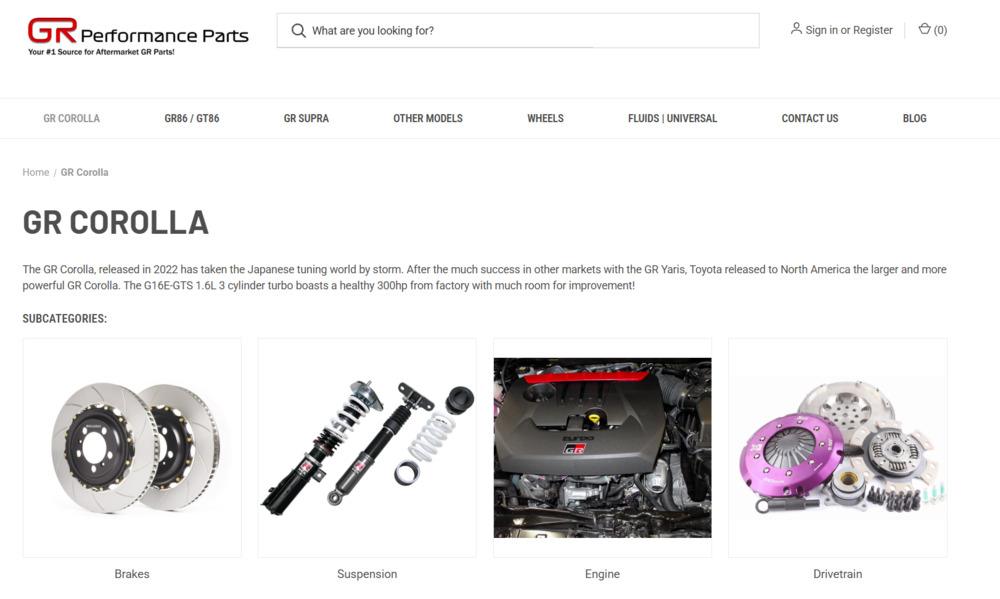
There is no universal word count an ecommerce category page needs in order to rank.
The better question is: What does a shopper need to understand before browsing these products?
For some categories, two or three useful sentences above the product grid may be enough. More complex products may require additional buying guidance, comparisons, specifications, FAQs, or educational content elsewhere on the page.
Useful introductory content can clarify:
- What products are included in the category
- Who or what they’re designed for
- Important differences shoppers should understand
- How to choose between available options
- What differentiates the products or selection
Don’t add 500 words because an SEO template tells you the page needs 500 words.
Add information because it helps the shopper make the next decision.
Layer 3: Filters, Faceted Navigation & Crawl Control
Filters are useful for shoppers. The SEO problem starts when every filter, sort option or combination creates another crawlable URL.
And I don’t assume the fix is simply “canonical everything back to the main category.”
How Should You Handle Faceted Navigation for Ecommerce SEO?
There isn’t one faceted-navigation rule I apply to every ecommerce site.
In recent ecommerce technical audits, I’ve seen how quickly filters, sorting options, product attributes, and URL parameters can create thousands of crawlable combinations. But I’ve also seen filtered combinations that represent legitimate search demand and deserve to exist as optimized landing pages.
That’s why I audit the actual implementation before deciding what should be crawlable or indexable.
I look at:
- What URLs the filters generate
- Whether search engines can crawl those URLs
- Which combinations are being indexed
- Whether they create duplicate or near-duplicate pages
- Whether Google is spending time crawling combinations with little standalone search value
- Whether particular filtered combinations already receive impressions, traffic, conversions, or revenue
- Whether the inventory is strong enough to support a standalone category
- Whether a filtered combination represents a distinct search intent the business should intentionally target
The goal is not to prevent customers from using filters.
The goal is to separate useful customer navigation from URLs that deserve to become search destinations.
That distinction matters because the right solution may be different from one ecommerce site to another. Depending on the platform and implementation, the answer could involve crawl controls, canonicals, internal linking changes, URL handling, dedicated static categories, or a combination of approaches.
This is why I would never prescribe “canonical all filtered URLs to the main category” without first understanding what those URLs are doing.
For example, a filtered page such as Women’s Waterproof Hiking Boots may represent a useful category with distinct search demand and enough inventory to support it.
A URL combining size 8 + black + newest first + under $150 may be useful to a shopper in that moment but have very little reason to exist as a standalone search result.
That’s the distinction I’m trying to make when auditing faceted navigation: some filtered experiences may deserve to become search destinations. Others should simply help shoppers navigate the catalog.
Can Search Engines Actually Access the Category Experience?
One of the recurring issues I look for in ecommerce technical audits is the gap between what works for a shopper in the browser and what search engines can reliably discover and process.
A category page can look completely functional while important products, links, pagination, or supporting content depend on JavaScript interactions that make discovery more difficult for search engines.
So I don’t stop at looking at the rendered page.
I want to understand how search engines reach:
- Product URLs
- Subcategories
- Paginated pages
- Important filtered categories
- Product names and attributes
- Breadcrumbs and navigation
- Supporting category content
For example, if the only way to discover products deeper in a category is for a shopper to click “Load More,” trigger a filter, or interact with JavaScript, I want to know whether those products still have crawlable internal-link paths elsewhere on the site.
This is a good example of why technical SEO still matters in AI-driven search.
Adding an “AI optimized” FAQ or another block of category copy won’t solve the problem if search systems struggle to access the underlying products, content, and relationships in the first place.
AI search optimization doesn’t replace technical SEO. It makes a strong technical foundation even more important.
Layer 4: Make the Product Grid Useful and Accessible
The product grid has two jobs: help shoppers evaluate their options and give search systems reliable access to the products within the category.
What belongs on each product card depends on the catalog and the buying decision. Price, availability, ratings, specifications, variations, or other attributes may be important, but I wouldn’t add information simply because an ecommerce SEO checklist says every product card needs it.
I’d ask what information actually helps a shopper decide which product deserves the next click.
From a technical perspective, I also want to know whether product links are crawlable, product information is accessible, images are properly optimized and the grid performs reliably across devices.
A visually impressive product grid isn’t much help if important products are difficult for search engines to discover or the experience becomes frustrating for shoppers.
Structured Data
Use structured data when it accurately represents content that is visible on the page and is appropriate for the page type.
For ecommerce sites, relevant structured data may help search engines better understand information such as products, prices, availability, ratings, and breadcrumbs.
Correct implementation can also make eligible pages available for supported search-result enhancements.
The important word is eligible.
Adding structured data does not guarantee that Google will display a rich result, and schema shouldn’t be added simply to chase more visually prominent search listings. It should accurately describe the page and follow the search engine’s applicable structured data guidelines.
Structured product information is also becoming increasingly important as AI-powered shopping experiences attempt to compare products, availability, prices and attributes on a shopper’s behalf.
Layer 5: Pagination, Load More & Product Discovery
There isn’t one universally correct pagination setup for every ecommerce site.
The question I care about is whether shoppers and search engines can reliably reach the products deeper in the category.
In audits, I look at:
- Whether page 2+ URLs are crawlable
- Whether their canonical tags make sense
- Whether products deeper in the category have other internal-link paths
- Whether paginated URLs themselves receive impressions or organic traffic
- Whether JavaScript-based “Load More” or infinite scroll leaves products inaccessible without user interaction
One mistake I specifically watch for is blanket-canonicalizing every paginated page back to page 1. That can send the wrong signal when page 2, page 3 and beyond contain different products users and search engines need to discover.
Pagination isn’t really a design choice in isolation.
It’s part of the site’s product-discovery and crawl architecture.
Category Content Should Help Search Engines, AI Systems and Customers Understand the Decision
A category page doesn’t need a block of SEO copy because “Google likes content” although it certainly doesn’t hurt.
It needs information that isn’t already obvious from looking at a grid of product thumbnails.
This is also where category pages can become more useful for AI-driven search.
Someone might not ask an AI assistant for “women’s hiking boots.”
They may ask:
- What kind of hiking boots are best for wet climates?
- What’s the difference between waterproof and water-resistant hiking boots?
- Which hiking boots are better for wide feet?
- What features matter for multi-day hikes?
A category page that clearly explains those distinctions gives search and AI systems useful, attributable information they can draw from when answering those more specific questions.
Depending on the category, useful content might include:
Buying guidance: What attributes should shoppers consider and why?
Comparisons: When is one material, feature or product type a better choice than another?
Specifications: Which measurements or technical attributes actually affect the decision?
FAQs: What questions do customers repeatedly ask before purchasing?
First-hand expertise: What has the business learned from selling, installing, testing or supporting these products?
Original data: What patterns can the business credibly share from sales, returns, customer questions, testing or product usage?
That last part matters more than you might realize! As I discovered, although our tracking tools are fairly sophisticated, there’s often tons of opportunity in customer and prospect conversations that tools can’t always uncover. And it’s the reason I created the LIVE (Listen. Investigate. Validate. Engineer.) Framework.
Generic summaries are easy to create. First-hand knowledge, proprietary data and specific expertise are much harder to replace.
How Category Page SEO Supports AEO and GEO Visibility

You’ll see this discussed as AEO, GEO, AI SEO or AI search optimization.
I don’t view these as replacements for SEO.
I view them as an expansion of the visibility problem.
Traditional category page SEO asks:
Can search engines find, understand and rank this page?
AI search adds another question:
Does this page contain clear, trustworthy information that an AI system could confidently use when helping someone research or compare products?
That makes several category-page fundamentals even more important:
Clear category meaning. Search systems need to understand exactly what products belong on the page.
Crawlable product relationships. Categories, subcategories and products need discoverable internal-link paths.
Useful product attributes. Price, availability, specifications, ratings and other factual information should be accurate and consistently represented.
Structured data and product feeds. These provide machine-readable product information and can support search and shopping experiences.
Expert guidance. Useful comparisons, buying considerations and first-hand knowledge give AI systems something more meaningful to retrieve than another product grid.
Self-contained answers. A short paragraph that clearly answers “What’s the difference between X and Y?” is easier for both humans and answer systems to use than vague marketing copy.
Fresh information. Ecommerce facts change. Price, inventory, specifications and availability need to remain accurate.
None of these guarantees a citation in ChatGPT, Copilot, Google AI Overviews or another AI experience.
They improve the underlying conditions that make your content understandable, retrievable and useful enough to be considered.
That’s the connection between SEO and AEO/GEO that matters.
Technical Performance: Look at the Template, Not Just the Score
Ecommerce category pages can get technically heavy fast.
Product images, filters, sorting, reviews, merchandising modules, tracking scripts, personalization, and JavaScript interactions can all affect how quickly and reliably the page works.
PageSpeed Insights and Core Web Vitals are useful diagnostic signals, but I don’t stop at the score.
When I’m auditing category templates, I want to understand what is actually creating the issue and whether it affects pages that matter for organic visibility and revenue.
That usually means looking at things like:
- Oversized or poorly delivered product images
- JavaScript that delays important content or links
- Layout shifts caused by product grids or merchandising elements
- Third-party scripts adding unnecessary load
- Mobile filter behavior
- Differences between what users see and what search engines can reliably render and process
- Whether important product or category links remain accessible without relying on a user interaction
The goal isn’t a perfect performance score.
The goal is to make commercially important category pages fast, accessible, understandable, and dependable for both customers and search systems.
Internal Linking Should Reflect Ecommerce Priorities
Internal linking on an ecommerce site isn’t just about passing authority from one page to another.
I use it to help search engines and shoppers understand which categories and products matter, how they relate, and where they sit within the broader catalog.
When I audit internal linking for ecommerce sites, I’m looking for questions such as:
- Are strategically important categories buried too deep?
- Can shoppers and search engines reach important subcategories through crawlable navigation?
- Are high-value products dependent on pagination or filters for discovery?
- Do breadcrumbs accurately reflect the catalog structure?
- Are relevant buying guides and educational resources connected to the commercial pages they support?
- Are discontinued, seasonal, or low-value products receiving disproportionate internal-link visibility?
- Are we linking based on business and customer priorities, or simply because the CMS happens to generate the link?
The goal is not to maximize the number of internal links.
It’s to create a site structure that reflects the products and categories the business actually wants customers to discover.
That’s where internal linking becomes strategic rather than another SEO checklist item.
Category Page SEO Has to Connect Visibility With Conversion
SEO can increase the number of qualified shoppers reaching a category page. It can’t make a weak category experience valuable simply by sending more traffic to it.
That’s why conversion performance is part of how I evaluate category SEO opportunities.
If a category already attracts relevant organic traffic but shoppers rarely move into products or convert, I want to understand why before making “more traffic” the goal.
The issue might be:
- Poor product availability
- A mismatch between the search intent and the products displayed
- Weak filtering or product discovery
- Important product information missing from the category experience
- Poor mobile usability
- Merchandising that pushes the wrong products
- A category that simply doesn’t support the commercial intent we’re targeting
This matters for prioritization.
If two categories have similar search opportunities but one has healthy inventory, stronger margins, and a proven ability to convert qualified visitors, that may be the better place to invest SEO resources.
SEO gets much more valuable when visibility, merchandising, user experience, and business priorities are working in the same direction.
How I Measure Whether Ecommerce Category Page SEO Is Working
Rankings are useful diagnostic signals, but they aren’t the final score I use to evaluate ecommerce SEO.
I prefer to look at category-page performance as a chain:
Visibility → Qualified Traffic → Product Engagement → Conversion → Revenue
First, did the page gain visibility for searches that actually align with the products the business sells?
Did product pages within the category see more rankings?
Then, did that visibility produce qualified organic traffic?
Once those shoppers arrived, did they move deeper into the catalog, interact with relevant products, and progress toward a purchase?
Finally, did that activity contribute to conversions and organic revenue?
I use that progression because rankings and traffic can improve while the business outcome gets worse.
A category can attract substantially more organic traffic without generating more revenue if the additional visibility comes from weaker intent, poor-fit searches, unavailable inventory, or visitors who never move beyond the category page.
That’s why “organic traffic increased” isn’t a complete ecommerce SEO result.
The better question is what that additional visibility did for the business.
What Ecommerce Technical Audits Have Reinforced for Me
A lot of my recent technical SEO audit work has been on ecommerce sites, and one thing that work continues to reinforce is that category-page problems rarely exist in isolation.
What initially looks like a content problem may actually be an internal-linking or crawlability problem.
What looks like an indexation problem may start with faceted navigation or the way the platform generates URLs.
What looks like a ranking problem may be complicated by inventory, search intent, merchandising, or conversion performance.
And what looks like the biggest SEO opportunity based on search volume may not be the best business opportunity once you look at revenue potential.
That’s why I don’t evaluate ecommerce category pages as isolated URLs or optimize them against a generic checklist.
I look at how the category fits into the broader ecommerce system, what is actually limiting its performance, and which improvements have the best chance of creating meaningful business impact.
Your Category Page Optimization Plan
Don’t try to optimize all categories at once.
Phase 1: Find the Categories With the Greatest Opportunity
Don’t automatically start with your five highest-traffic category pages.
Start with the categories where better organic visibility could have the greatest business impact.
Depending on the business, I may evaluate:
- Organic revenue and conversions
- Existing search visibility
- Relevant search demand
- Conversion rate
- Inventory depth and availability
- Product margins or strategic importance
- Competitive visibility
- Current ranking opportunities
- Technical or content weaknesses
- Internal-linking support
This changes the conversation from “Which pages can we get more traffic to?” to “Where can SEO create the most meaningful opportunity?”
Those aren’t always the same pages.
Phase 2: Determine What Is Actually Limiting the Page
Once you’ve identified the categories with the strongest business opportunity, diagnose the constraint.
Is the problem:
- Weak relevance?
- Poor crawlability?
- Weak internal linking?
- Crawl depth?
- Faceted navigation?
- Indexation?
- Duplicate category structures?
- JavaScript rendering?
- Thin or unhelpful category information?
- Poor product availability?
- Weak conversion performance?
Different problems require different fixes.
This is why I don’t start every ecommerce engagement by rewriting title tags and adding category copy.
The highest-impact recommendation depends on what is actually holding the page back.
Phase 3: Fix Structural Problems Before Decorating the Page
If important categories are orphaned, buried four or five clicks deep, blocked from crawling, canonicalized incorrectly or dependent on JavaScript interactions for discovery, adding another 500 words isn’t the first thing I’d recommend.
Fix the accessibility and architecture first.
Phase 4: Improve the Information Available to Searchers and AI Systems
Once the foundation is sound, add the category-specific information customers actually need: buying criteria, comparisons, specifications, FAQs, expert insight and differentiators.
This is where the page can become more useful not just for traditional rankings, but for AI-generated answers and product-research experiences.
Phase 5: Measure the Business Result
Monitor visibility, traffic, product engagement, conversions and revenue.
And increasingly, look at AI visibility too. Bing Webmaster Tools now reports how publisher URLs are cited across Microsoft Copilot and other supported AI experiences, giving marketers another way to evaluate visibility beyond traditional rankings.
The goal isn’t just to prove the page moved three ranking positions.
It’s to understand whether more customers are discovering the category, choosing the business and buying.
The Reality Check
Category page SEO isn’t about adding 500 words below a product grid, checking off a schema box, or forcing a keyword into an H1.
And a #1 ranking isn’t much of a win if the traffic never turns into business.
The category pages worth investing in are the ones that connect search demand with the products the business actually wants to sell and make it easier for shoppers to move from discovery to decision.
That’s the standard I use when evaluating ecommerce category pages:
Can it show up for the right searches?
Does the page give shoppers a reason to choose these products and this business?
And does that visibility contribute to measurable results?
Show Up. Get Chosen. Deliver Results.
That’s what turns category page SEO from a collection of optimization tasks into an ecommerce growth strategy.
Ready to transform your category pages into revenue engines? Let’s audit your top categories, identify optimization opportunities, and build a strategy to increase both rankings and conversions. Schedule a free ecommerce SEO consultation.

J. “Ivy” Boyter is the founder of Full Throttle SEO, a Florida-based SEO consultancy. With nearly 15 years of digital marketing experience, she helps businesses turn search visibility into qualified leads and revenue, with a focus on ecommerce SEO, technical audits, and visibility in AI-powered search. Her approach connects SEO priorities to business goals, helping brands show up, get chosen, and deliver results.
Outside of work, Ivy competes in autocross and rallycross, wrangles kids and chickens, and writes heartfelt marriage and parenting advice.